 K
KModules
Authentication
Merchant
Catalog
Order
Events
Logistics
Shipping
Review
Financial
Solutions
How it works
The Catalog API organizes your menu into three levels: catalog, category, and item. Items have add-ons and can have different pricing and availability per sales channel (context).This guide shows when to call each endpoint. For hands-on examples, see Introduction. For the complete reference, see Endpoints.Integration flow
Every integration follows six steps:- Authenticate — Get an
accessToken. See Authentication. - List catalogs —
GET /catalogs. Every store already has at least one. - Create categories —
POST /categoriesgroups items (sandwiches, drinks, desserts). - Create items —
PUT /itemssends item, products, option groups, and options in one call. - Update price and status —
PATCH /items/priceandPATCH /items/statusfor individual changes. - Track batch operations —
GET /batch/{batchId}for asynchronous patches.
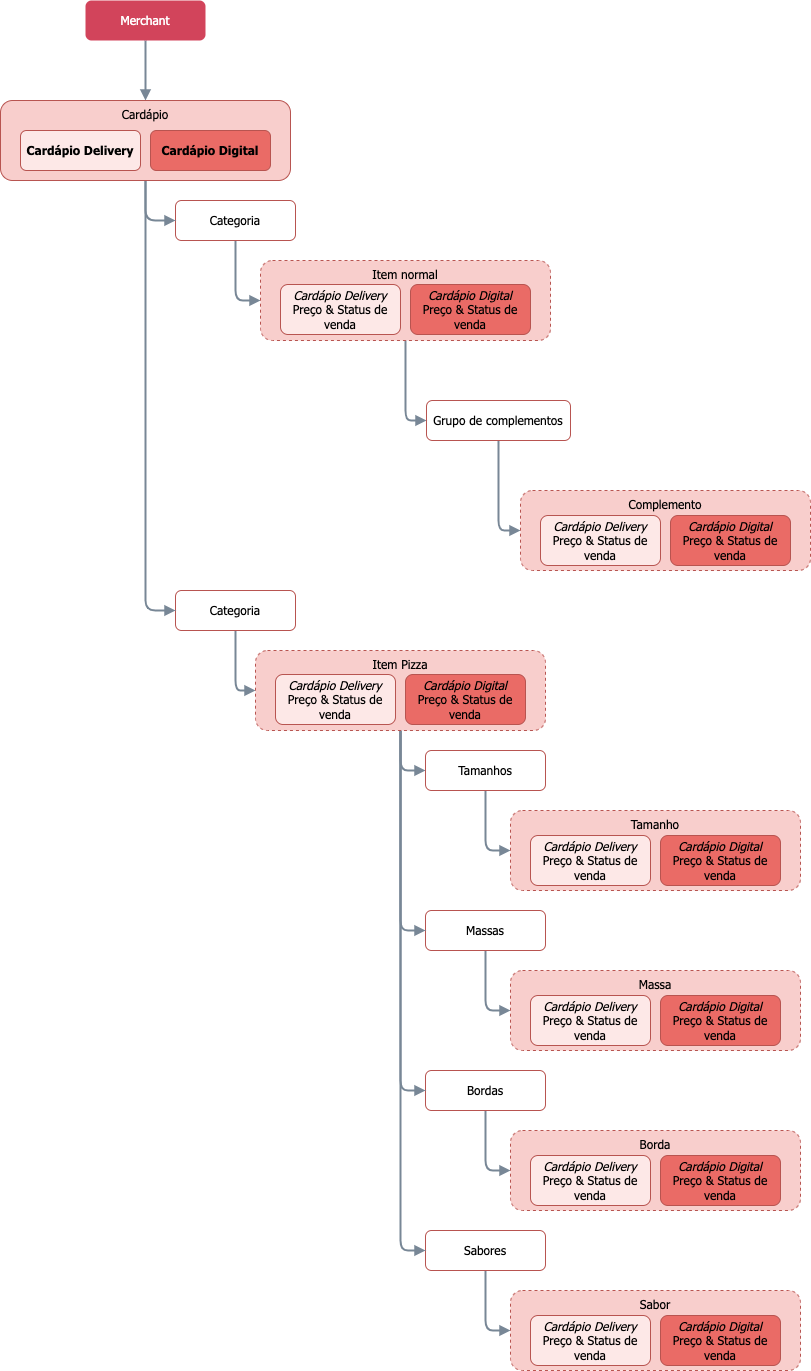

Item lifecycle
Every item has two states:AVAILABLE— Customers can purchase.UNAVAILABLE— Item paused. Does not appear in the app until it returns toAVAILABLE.
PATCH /items/status to toggle states without resending the complete item.Choose the right endpoint
The change you want to make determines the endpoint:| Change | Endpoint | Notes |
|---|---|---|
| Create or rewrite a complete item | PUT /items | Sends item, products, groups, and options in one call. Idempotent. |
| Change item price | PATCH /items/price | Changes only item price. Supports batch. |
| Change add-on price | PATCH /options/price | Changes only add-on (option) price. Supports batch. |
| Pause or reactivate an item | PATCH /items/status | Changes only status. Supports batch. |
| Pause an add-on option | PATCH /options/status | Affects a single option. |
| Pause all options in a group | PATCH /optionGroups/status | Affects the entire group. |
| Adjust inventory | POST /inventory | Sets the maximum sellable quantity. |
PUT /items replaces the complete item — omitted fields are removed. Use PATCH for individual changes.Idempotency
PUT /items is idempotent: calling twice with the same payload does not create duplicates. The second call overwrites the first, simplifying retries on transient failures.Payload examples
Create a simple item
PUT /catalog/v2.0/merchants/{merchantId}/items{
"item": {
"id": "burger-001",
"type": "DEFAULT",
"categoryId": "appetizers",
"status": "AVAILABLE",
"price": {"value": 25.00}
},
"products": [
{
"id": "burger-prod-001",
"name": "X-Burger"
}
],
"optionGroups": [],
"options": []
}Add add-ons
Use the samePUT /items with optionGroups and options filled in:{
"item": { /* ... */ },
"products": [ /* ... */ ],
"optionGroups": [
{
"id": "550e8400-e29b-41d4-a716-446655440010",
"name": "Choose a drink",
"min": 0,
"max": 1,
"optionIds": ["550e8400-e29b-41d4-a716-446655440020", "550e8400-e29b-41d4-a716-446655440021"]
}
],
"options": [
{
"id": "550e8400-e29b-41d4-a716-446655440020",
"productId": "550e8400-e29b-41d4-a716-446655440002",
"price": {"value": 8.00}
},
{
"id": "550e8400-e29b-41d4-a716-446655440021",
"productId": "550e8400-e29b-41d4-a716-446655440003",
"price": {"value": 12.00}
}
]
}Update prices in batch
PATCH /catalog/v2.0/merchants/{merchantId}/items/price{
"prices": [
{"productId": "burger-prod-001", "price": 26.50},
{"productId": "burger-prod-002", "price": 28.00}
]
}batchId. Track it with GET /batch/{batchId}:GET /catalog/v2.0/merchants/{merchantId}/batch/{batchId}{
"batchId": "batch-123",
"status": "COMPLETED",
"successCount": 95,
"failureCount": 5
}GET /batch/{batchId} until the status is COMPLETED before assuming changes are applied.Multi-channel with contexts
Offer the same item across different channels (Delivery, Digital Menu, Dine-in) with distinct prices and statuses. UsecontextModifiers instead of duplicating items:{
"item": {
"id": "550e8400-e29b-41d4-a716-446655440000",
"price": {"value": 25.00},
"status": "AVAILABLE",
"contextModifiers": [
{
"catalogContext": "WHITELABEL",
"price": {"value": 28.00},
"status": "UNAVAILABLE"
}
]
}
}contextModifiers override root values only in that context. Available contexts:DEFAULT— DeliveryWHITELABEL— Digital MenuINDOOR— Dine-in
PUT /multisetup/items. See Multi-menu.Next steps
Choose the topic most relevant to your integration:- Practical tutorial — Introduction has a 5-step example.
- Technical reference — Fundamentals documents each field.
- Common patterns — Common Patterns covers typical use cases.
- Special structures — See Pizza, Combo, or Multi-menu.
- Endpoint details — Endpoints shows each request and response.
Was this page helpful?
Rate your experience in the new Developer portal: