 K
KModules
Logistics
Authentication
Merchant
Catalog
Order
Events
Shipping
Review
Financial
Solutions
Order details
UseGET /orders/{id} to retrieve food order details. Returns 200 OK with: general information, merchant, customer, items, options, benefits, additional fees, totals, payments, picking, delivery, takeout, dine-in, indoor (unavailable), scheduling, and additional info.curl -X GET "https://merchant-api.ifood.com.br/order/v1.0/orders/{id}" \
-H "Authorization: Bearer {token}"Fields
General information
| Field | Type | Description |
|---|---|---|
| id | uuid | Unique order identifier |
| displayId | string | User-friendly ID for store order identification. |
| orderType | enum | Order type: DELIVERY, TAKEOUT, DINE_IN, INDOOR |
| orderTiming | enum | IMMEDIATE or SCHEDULED |
| salesChannel | string | Order origin: IFOOD, DIGITAL_CATALOG, POS, TOTEM, IFOOD_SHOP, GROCERY_WHITELABEL |
| category | string | Order category: FOOD, GROCERY, ANOTAI, FOOD_SELF_SERVICE |
| createdAt | date | Order creation date |
| preparationStartDateTime | date | Recommended preparation start time |
| isTest | boolean | Indicates whether this is a test order |
| extraInfo | string | Additional order information |
{
  "id": "32c15e00-9861-4548-b5f0-15580defc999",
  "displayId": "fc999",
  "orderType": "DELIVERY / INDOOR / TAKEOUT / DINE_IN",
  "orderTiming": "IMMEDIATE/SCHEDULED",
  "salesChannel": "IFOOD / DIGITAL_CATALOG / POS / TOTEM / IFOOD_SHOP / GROCERY_WHITELABEL",
  "category": "FOOD / GROCERY / ANOTAI / FOOD_SELF_SERVICE",
  "createdAt": "2020-01-01T00:00:00.000Z",
  "preparationStartDateTime": "2020-01-01T00:00:00.000Z",
  "isTest": false,
  "extraInfo": "Pago Online. NÃO LEVAR MÁQUINA",
  ...
}
merchant
| Field | Type | Description |
|---|---|---|
| id | uuid | unique merchant (store) identifier |
| name | string | merchant (store) name |
{
  "merchant": {
    "id": "50647eee-5eb6-41a2-b2d8-999998ed677f",
    "name": "Nome da Loja"
  }
}
customer
| Field | Type | Description |
|---|---|---|
| id | uuid | unique customer identifier |
| name | string | customer name |
| documentNumber | string | customer document number (CPF) that should only be used to issue tax documents when requested by the customer, as this field is optional. |
| documentType | string | indicates the type of client document (CPF or idEstrangeiro) - Will be sent starting March 15, 2026 |
| ordersCountOnMerchant | integer | number of orders already placed by this customer at this store in the last 5 years. Optional field (may occasionally be null). |
| phone.number | string | customer phone number or toll-free number provided by iFood |
| phone.localizer | string | locator code that should be entered when calling the toll-free number |
| phone.localizerExpiration | date | expiration date of the toll-free number |
| segmentation | string | Customer classification regarding Super-Segmentation (Explorer, Bronze, Silver, Gold, Platinum). This field is optional and may not be returned. |
Important Guidance
Segmentation information is confidential and may not, under any circumstances, be disclosed, reproduced, or provided to unauthorized third parties or end customers.
{
  "customer": {
    "id": "50647eee-5eb6-41a2-b2d8-999998ed677f",
    "name": "Nome do Cliente",
    "documentNumber": "07544829999",
    "documentType": "CPF",
    "ordersCountOnMerchant": 8,
    "phone": {
      "number": "0800 XXX XXXX",
      "localizer": "27534642",
      "localizerExpiration": "2020-01-01T00:00:00.000Z"
    },
    "segmentation": "Platinum"
  }
}
Phone field is optional
The phone field is optional and will no longer be sent 3 hours after the order's designated delivery date. Please note that, even during this period, some orders may not have a phone number. If you need to contact the customer, you can use chat.
items
| Field | Type | Description |
|---|---|---|
| index | integer | item position/order |
| id | uuid | Unique identifier of the item in the catalog |
| uniqueId | uuid | Unique identifier of the item in the order (required, since the same item can appear multiple times in the order) |
| imageUrl | string | URL of the item's image/photo. When available, the URL returns, by default, an image in high quality. You can change the path of this image to obtain the image in other qualities. |
| externalCode | string | Item code in your application (codPDV). It is optional and can be configured in the catalog |
| name | string | item name |
| type | string | item type |
| quantity | double | item quantity |
| unit | string | item unit (Ex.: UN, g, Kg, ml, L) |
| unitPrice | double | unit price |
| price | double | item price: price = quantity x (unitPrice + addition) |
| scalePrices | object | quantity and price information for wholesale sales |
| optionsPrice | double | price of add-ons (options) |
| totalPrice | double | total price including add-ons (totalPrice = price + optionsPrice) |
| observations | string | order observations. (Ex.: "Remove onion") Maximum length: 1024 characters |
| options | object | list containing item add-on information |
Image quality
Specify quality by changing thet_<quality> segment in the URL:low— Low quality. Ideal for quick views or when bandwidth is a concern.medium— Balance between quality and file size.high— Best available quality. Recommended for precise details.
- Low quality:
https://static-images.ifood.com.br/image/upload/t_low/pratos/4c714577-fe5d-4d31-9531-f9ebb7f89249/202104071957_0mfD_.jpeg - Medium quality:
https://static-images.ifood.com.br/image/upload/t_medium/pratos/4c714577-fe5d-4d31-9531-f9ebb7f89249/202104071957_0mfD_.jpeg - High quality:
https://static-images.ifood.com.br/image/upload/t_high/pratos/4c714577-fe5d-4d31-9531-f9ebb7f89249/202104071957_0mfD_.jpeg
{
  "items": [
    {
      "index": 1,
      "id": "1bd9cbac-a4a6-497e-953d-e6d0661180d5",
      "uniqueId": "092ce140-b809-4a13-b776-31d9792eee99",
      "name": "Nome do Produto",
      "type": "Tipo do Produto",
      "imageUrl": "https://static-images.ifood.com.br/image/upload/t_high/pratos/4c714577-fe5d-4d31-9531-f9ebb7f89249/202104071957_0mfD_.jpeg",
      "externalCode": "2331",
      "ean": "7898903529999",
      "quantity": 2,
      "unit": "UN/G/KG/L/ML",
      "unitPrice": 10,
      "price": 20,
      "scalePrices": {
        ...
      },
      "optionsPrice": 4,
      "totalPrice": 24,
      "observations": "Retirar cebola",
      "options": [
        ...
      ]
    }
  ]
}
items[].options
| Field | Type | Description |
|---|---|---|
| index | integer | complement position/order |
| id | uuid | unique complement identifier |
| name | string | complement name |
| groupName | string | complement group name |
| type | string | complement type |
| externalCode | string | complement code in your application (codPDV). It is optional and can be configured in the catalog |
| unit | string | item unit (Ex.: UN, g, Kg, ml, L) |
| unitPrice | double | unit price |
| addition | double | Additional value that can be included in the complement price. (Ex: For pizzas with more than one topping, you can configure the catalog to charge the price of the highest-priced flavor. In these cases, this is the difference between the original price of the lowest-priced flavor and the highest-priced flavor.) |
| price | double | add-on price: price = quantity x (unitPrice + addition) |
| customization | array | list containing information about the third-level add-on for the item |
{
  "options": [
    {
      "index": 1,
      "id": "3dc09021-be6b-4be6-92a1-15a07b464141",
      "name": "Nome do Complemento",
      "groupName": "Nome Grupo do Complemento",
      "type": "Tipo do Complemento",
      "externalCode": "ABC123",
      "quantity": 2,
      "unit": "UN/G/KG/L/ML",
      "unitPrice": 2,
      "addition": 1,
      "price": 6,
      "customization": [
        ...
      ]
    }
  ]
}
options.customizations
| Field | Type | Description |
|---|---|---|
| id | uuid | unique identifier of the third-level add-on |
| name | string | name of the item of the third-level add-on |
| groupName | string | name of the group of the third-level add-on |
| externalCode | string | item code of the third-level add-on in your application (codPDV). This is optional and can be configured in the catalog. |
| type | string | type of the third-level add-on |
| quantity | integer | quantity of the item of the third-level add-on |
| unitPrice | double | unit price |
| addition | double | Additional amount that can be included in the price of the third-level add-on. (Ex.: For pizzas with more than one topping, you can configure the catalog to charge the price of the highest-value flavor. In these cases, this is the difference between the original price of the lowest-value flavor and the highest-value flavor.) |
| price | double | total price of the third-level complement item: price = quantity x (unitPrice + addition) |
{
  "customizations": [
    {
      "id": "acea6ac1-f595-4a6b-af00-cc2f1fa0886a",
      "groupName": "Example GroupName",
      "externalCode": "ABC123",
      "type": "Example Type",
      "name": "Example name",
      "quantity": 2,
      "unitPrice": 2,
      "addition": 1,
      "price": 6
    }
  ]
}
items[].scalePrices
| Field | Type | Description |
|---|---|---|
| defaultPrice | double | Default price of the item without change |
| scales | array | list containing quantity and price information for wholesale sales |
{
  "scalePrices": {
  "defaultPrice": 20,
  "scales": [
    ...
  ]
}
}
scalePrices.scales
| Field | Type | Description |
|---|---|---|
| price | double | Item price with wholesale discount |
| minQuantity | integer | Minimum quantity of items to apply discount |
{
  "scales": [
    {
      "price": 15,
      "minQuantity": 5
    }
  ]
}
benefits
iFood users can receive various types of discount coupons/vouchers to use in the app, which we call benefits.These discount coupons can be subsidized by either iFood or the partner. They appear in the order details in the benefits field, and the subsidized amount for each party appears in the sponsorship field.These coupons can be applied to a specific item, the subtotal of the items (cart), or the delivery fee (target).| Field | Type | Description |
|---|---|---|
| value | double | discount/incentive amount |
| target | string | information about where the discount will be applied. |
| targetId | string | item index (items.index) to which the discount should be applied. Only for cases where the target is of the ITEM or PROGRESSIVE_DISCOUNT_ITEM type |
| sponsorshipValues.name | string | name of the sponsor of this benefit |
| sponsorshipValues.value | double | amount subsidized by the sponsor |
| sponsorshipValues.description | double | description of the discount sponsor to be displayed in the app or on the printed order |
| campaign.id | uuid | unique identifier of the respective benefit's campaign |
| campaign.name | string | name of the respective benefit's campaign |
| campaign.description | string | description of the respective benefit's campaign |
| target | Description |
|---|---|
| CART | Discount is applied to the cart subtotal (sum of the order items). |
| DELIVERY_FEE | Discount is applied to the delivery fee. |
| ITEM | Discount is applied to a specific item in the cart. The targetId field specifies which item the discount was applied to. This specification is made in the campaign configuration. |
| PROGRESSIVE_DISCOUNT_ITEM | Progressive discount on identical items in the order, forming a combo. |
| sponsorship | Treatment |
|---|---|
| IFOOD | The value of the coupon(s) should be treated as a type of payment, as iFood will transfer this amount to the store. |
| EXTERNAL | The value of the coupon(s) should be treated as a type of payment, as iFood will transfer this amount subsidized by the external partner to the store. |
| MERCHANT | The value of the coupon(s) should be treated as a discount, as the subsidy in this case is the responsibility of the merchant (store). |
| CHAIN | The value of the coupon(s) should be treated as a type of payment, because even though the subsidy is the responsibility of the network (group of stores), iFood charges this benefit to the partner at the time of reconciliation. |
{
  "benefits": [
    {
      "value": 10,
      "target": "CART",
      "sponsorshipValues": [
        {
          "name": "IFOOD",
          "value": 0,
          "description": "Incentivo do iFood"
        },
        {
          "name": "MERCHANT",
          "value": 10,
          "description": "Incentivo da Loja"
        }
      ],
      "campaign": {
        "id": "42cea1aa-1e23-4741-b48a-300716de08de",
        "name": "my campaign name",
        "description": "my campaign description"
      }
    },
    {
      "value": 4.99,
      "target": "DELIVERY_FEE",
      "sponsorshipValues": [
        {
          "name": "EXTERNAL",
          "value": 4.99,
          "description": "Incentivo da Indústria"
        },
        {
          "name": "MERCHANT",
          "value": 0,
          "description": "Incentivo da Loja"
        }
      ],
      "campaign": {
        "id": "42cea1aa-1e23-4741-b48a-300716de08de",
        "name": "my campaign name"
      }
    },
    {
      "value": 4.99,
      "target": "ITEM",
      "targetId": "1",
      "sponsorshipValues": [
        {
          "name": "IFOOD",
          "value": 4.99,
          "description": "Incentivo do iFood"
        },
        {
          "name": "MERCHANT",
          "value": 0,
          "description": "Incentivo da Loja"
        }
      ],
      "campaign": {
        "id": "42cea1aa-1e23-4741-b48a-300716de08de",
        "name": "my campaign name"
      }
    }
  ]
}
additionalFees
Fees applied by iFood (service, brokerage, etc.). Consider for demonstrative purposes in total order calculation. All fees represent iFood revenue and should not be added to invoices, as they are not merchant revenue.Theliabilities.name field identifies who pays each fee.| Field | Type | Description |
|---|---|---|
| type | string | fee type (new fees can be added and should be treated as strings) |
| description | string | description of the fee type to be displayed in the application or printed order |
| fullDescription | string | full description of the fee type to be displayed in the application or printed order |
| value | double | service fee amount |
| liabilities | array | list containing information about those responsible for the fee and their respective percentages |
| liabilities.name | string | person responsible for paying the fee |
| liabilities.percentage | double | percentage that the corresponding person responsible must pay |
{
  "additionalFees": [
    {
      "type": "SMALL_ORDER_FEE",
      "description": "Taxa de Serviço",
      "fullDescription": "Taxa de serviço cobrada quando o valor do pedido é inferior ao pedido mínimo.",
      "value": 1.0,
      "liabilities": [
        {
          "name": "IFOOD",
          "percentage": 100
        }
      ]
    }
  ]
}| type | Description |
|---|---|
| SMALL_ORDER_FEE | Service fee for orders below the minimum value |
total
| Field | Type | Description |
|---|---|---|
| subTotal | double | sum of item values |
| deliveryFee | double | delivery fee amount |
| benefits | double | sum of benefits (discount coupons) |
| additionalFees | double | sum of additional fees |
| orderAmount | double | total order value (orderAmount = subTotal + deliveryFee + additionalFees - benefits) |
{
  "total": {
    "subTotal": 50,
    "deliveryFee": 10,
    "additionalFees": 2,
    "benefits": 5,
    "orderAmount": 57
  }
}
payments
| Field | Type | Description |
|---|---|---|
| prepaid | double | amount already paid (ONLINE) |
| pending | double | pending amount to be charged upon delivery (OFFLINE) |
| methods.value | double | payment amount |
| methods.currency | string | currency |
| methods.type | string | payment type: ONLINE (payment has already been made online through the app and should not be charged upon delivery) or OFFLINE (payment must be made upon delivery of the order) |
| methods.method | string | payment method (CASH / CREDIT / DEBIT / MEAL_VOUCHER / FOOD_VOUCHER / GIFT_CARD / DIGITAL_WALLET / PIX / OTHER) |
| methods.wallet.name | string | wallet name (only for digital wallet payments) |
| methods.card.brand | string | card brand name |
| methods.cash.changeFor | double | change amount |
| methods.transaction.authorizationCode | string | Authorization number for the credit and/or debit card transaction (NFe cAut field). |
| methods.transaction.acquirerDocument | string | CNPJ of the Transaction Intermediary (agency, delivery platform, marketplace, and similar) for services and businesses |
Discount amount greater than the total order amount
It is possible for the customer to use a benefit (voucher/coupon) with a value greater than the total order amount. When this happens, the amount to be charged is zero. Example: Order amount = R$40.00 and Coupon amount = R$50.00. Amount to be charged to the customer: R$0.00.
{
  "payments": {
    "prepaid": 20,
    "pending": 45,
    "methods": [
      {
        "value": 10,
        "currency": "BRL",
        "type": "ONLINE",
        "method": "CREDIT / DEBIT / MEAL_VOUCHER / FOOD_VOUCHER",
        "card": {
          "brand": "Nome da Bandeira"
        },
        "transaction": {
          "authorizationCode": "6982354",
          "acquirerDocument": "12345678901234"
        }
      },
      {
        "value": 10,
        "currency": "BRL",
        "type": "ONLINE",
        "method": "DIGITAL_WALLET",
        "wallet": {
          "name": "APPLE_PAY/GOOGLE_PAY/SAMSUNG_PAY"
        },
        "card": {
          "brand": "Nome da Bandeira"
        }
      },
      {
        "value": 0.01,
        "currency": "BRL",
        "method": "PIX",
        "type": "ONLINE",
        "card": {
          "brand": "PIX"
        }
      },
      {
        "value": 45,
        "currency": "BRL",
        "type": "OFFLINE",
        "method": "CASH ",
        "cash": {
          "changeFor": 50
        }
      }
    ]
  }
}
picking
These fields are exclusive to grocery orders.| Field | Type | Description |
|---|---|---|
| picker | string | Responsible for picking the order items (Ex: DRIVER_SHOPPER). When not specified, the merchant is responsible for picking the items and preparing the order. |
| replacementOptions | string | Options for replacing an item in case of a stockout (Ex: STORE_CHOOSE_OTHER_ITEMS / STORE_CONTACT_CUSTOMER / STORE_CANCEL_ORDER / STORE_REMOVE_ITEMS) |
{
  "picking": {
    "picker": "DRIVER_SHOPPER",
    "replacementOptions": "STORE_CHOOSE_OTHER_ITEMS / STORE_CONTACT_CUSTOMER / STORE_CANCEL_ORDER / STORE_REMOVE_ITEMS"
  }
}
delivery
| Field | Type | Description |
|---|---|---|
| mode | string | Codes for iFood's internal controls (new codes may be added at any time). Possible values: DEFAULT / EXPRESS / HIGH_DENSITY / TURBO / PRIORITY / FAST_DELIVERY / ECONOMIC |
| description | string | Type of delivery requested by the customer. Possible values: Standard / Fast / Turbo. Standard: Standard iFood delivery; Fast: Delivery 20% faster than Standard, with a variable cost. No advance preparation required by the establishment. Turbo: Delivery in up to 20 minutes, with a fixed cost. Requires order preparation by the establishment within 7 minutes. |
| deliveredBy | string | Person responsible for delivery: IFOOD (iFood logistics) or MERCHANT (own delivery) |
| pickupCode | string | security code to match the code provided by the delivery person when picking up the order |
| deliveryDateTime | date | date and time of delivery |
| observations | string | delivery notes (Ex: "There is no doorman. Please call the intercom.") |
| deliveryAddress | -- | address where the order should be delivered |
{
  "delivery": {
    "mode": "DEFAULT / EXPRESS / HIGH_DENSITY / TURBO / PRIORITY / FAST_DELIVERY / ECONOMIC",
    "description": "Padrão / Rápida / Turbo",
    "deliveredBy": "IFOOD / MERCHANT",
    "deliveryDateTime": "2020-01-01T00:00:00.000Z",
    "observations": "Deixar na portaria",
    "deliveryAddress": {...},
    "pickupCode": "1234"
  }
}
deliveryAddress
| Field | Type | Description |
|---|---|---|
| streetName | string | street or avenue name |
| streetNumber | string | number (Note: may contain letters) |
| formattedAddress | string | formatted address (Street + Number) |
| neighborhood | string | neighborhood or sector |
| complement | string | complement (Ex: Apartment, Block, Lot) |
| reference | string | reference point |
| postalCode | string | postal code (ZIP Code). Optional field, may occasionally be sent as zero |
| city | string | city |
| state | string | state |
| country | string | country |
| coordinates.latitude | double | latitude |
| coordinates.longitude | double | longitude |
{
  "deliveryAddress": {
    "streetName": "RUA X",
    "streetNumber": "20A",
    "formattedAddress": "RUA X, 20A",
    "neighborhood": "Bairro / Setor",
    "complement": "Apto 101",
    "reference": "perto da praça",
    "postalCode": "99999999",
    "city": "SAO PAULO",
    "state": "SP",
    "country": "BR",
    "coordinates": {
      "latitude": -26.999999,
      "longitude": -48.999999
    }
  }
}
takeout
| Field | Type | Description |
|---|---|---|
| mode | string | Pickup mode: DEFAULT (customer picks up the order at the counter) / PICKUP_AREA (customer will wait for the order in a special parking spot) |
| takeoutDateTime | date | date and time of order pickup |
| observations | string | observations about order pickup |
{
  "takeout": {
    "mode": "DEFAULT / PICKUP_AREA:",
    "takeoutDateTime": "2020-01-01T00:00:00.000Z",
    "observations": "Observações sobre a retirada"
  }
}
dineIn
| Field | Type | Description |
|---|---|---|
| deliveryDateTime | date | date and time of order delivery or pickup |
{
  "dineIn": {
    "deliveryDateTime": "2024-09-17T00:00:00.000Z"
  }
}
indoor
(Note: Service currently unavailable)| Field | Type | Description |
|---|---|---|
| mode | string | Pickup mode: DEFAULT (customer picks up the order at the counter) / TABLE (customer will wait for the order at a table in the establishment) |
| table | string | number or code of the table where the customer placed the order (only when mode = TABLE) |
| deliveryDateTime | date | date and time of order delivery or pickup |
| observations | string | observations about order pickup |
{
  "indoor": {
    "mode": "DEFAULT / TABLE:",
    "table": "01",
    "deliveryDateTime": "2020-01-01T00:00:00.000Z",
    "observations": "Observações sobre a entrega ou retirada"
  }
}
scheduled
| Field | Type | Description |
|---|---|---|
| schedule.deliveryDateTimeStart | date | start of the scheduled time (range) |
| schedule.deliveryDateTimeEnd | date | end of the scheduled time (range) |
{
  "schedule": {
    "deliveryDateTimeStart": "2020-01-01T00:20:00.000Z",
    "deliveryDateTimeEnd": "2020-01-01T01:20:00.000Z"
  }
}
additionalInfo
| Field | Type | Description |
|---|---|---|
| metadata | map<string,string> | Open-ended key-value field that allows merchants to include relevant information in the order |
POS Orders
These fields are generally used in orders placed through the merchant's own sales channel (POS) and sent to the platform via API (
salesChannel=POS){
"additionalInfo": {
"metadata": {
"codigoInternoPdv": "18bf73f64715",
"nomeVendedor": "João"
}
}
}Examples
{
  "id": "63895716-37c3-4372-afd0-3240bfef708d",
  "orderTiming": "IMMEDIATE",
  "orderType": "DELIVERY",
  "salesChannel": "IFOOD",
  "category": "FOOD",
  "delivery": {
    "mode": "DEFAULT",
    "description": "Padrão",
    "deliveredBy": "IFOOD",
    "deliveryDateTime": "2021-02-09T18:10:32Z",
    "deliveryAddress": {
      "streetName": "Example",
      "streetNumber": "1234",
      "formattedAddress": "Example St., 1234, Apt. 1234",
      "neighborhood": "Examplehood",
      "complement": "Apt. 1234",
      "reference": "perto da praça",
      "postalCode": "12345678",
      "city": "Example City",
      "state": "Example State",
      "country": "BR",
      "coordinates": {
        "latitude": -2.1059418202311173e141,
        "longitude": -49545.71
      }
    },
    "pickupCode": "1234"
  },
  "displayId": "XPTO",
  "createdAt": "2021-02-16T18:10:27Z",
  "preparationStartDateTime": "2021-02-09T20:15:13Z",
  "merchant": {
    "id": "c54bb20a-bce0-4e38-bd4a-fe5f0a7b6b5a",
    "name": "Example Merchant"
  },
  "customer": {
    "id": "22587f70-60b4-423c-8cd2-27d288f47f99",
    "name": "Example Customer",
    "documentNumber": "123456789",
    "phone": {
      "number": "123456789",
      "localizer": "12345678",
      "localizerExpiration": "2021-02-09T18:11:07Z"
    },
    "ordersCountOnMerchant": 1234,
    "segmentation": "Gold"
  },
  "items": [
    {
      "index": 0,
      "id": "f1e48636-4bf0-4656-bce8-0e2214fcd3d4",
      "uniqueId": "092ce140-b809-4a13-b776-31d9792eee99",
      "name": "Example Item",
      "imageUrl": "https://static-images.ifood.com.br/image/upload/t_high/pratos/4c714577-fe5d-4d31-9531-f9ebb7f89249/202104071957_0mfD_.jpeg",
      "externalCode": "ex01",
      "ean": "12345678910",
      "unit": "G",
      "quantity": 12,
      "unitPrice": 0.12,
      "price": 1.44,
      "optionsPrice": 1.69,
      "totalPrice": 3.13,
      "observations": "This is an example item.",
      "options": [
        {
          "index": 0,
          "id": "acea6ac1-f595-4a6b-af00-cc2f1fa0886a",
          "name": "Example Option",
          "externalCode": "ex02",
          "ean": "12345678911",
          "unit": "UN",
          "quantity": 13,
          "unitPrice": 0.13,
          "addition": 0,
          "price": 1.69
        }
      ]
    }
  ],
  "benefits": [
    {
      "value": 1.0,
      "sponsorshipValues": [
        {
          "name": "IFOOD",
          "value": 0.5
        },
        {
          "name": "MERCHANT",
          "value": 0.5
        }
      ],
      "target": "CART",
      "campaign": {
        "id": "42cea1aa-1e23-4741-b48a-300716de08de",
        "name": "my campaign name"
      }
    },
    {
      "value": 0.5,
      "sponsorshipValues": [
        {
          "name": "IFOOD",
          "value": 0.5
        },
        {
          "name": "MERCHANT",
          "value": 0
        }
      ],
      "target": "ITEM",
      "targetId": "1",
      "campaign": {
        "id": "42cea1aa-1e23-4741-b48a-300716de08de",
        "name": "my campaign name"
      }
    },
    {
      "value": 0.49,
      "sponsorshipValues": [
        {
          "name": "IFOOD",
          "value": 0
        },
        {
          "name": "MERCHANT",
          "value": 0.49
        }
      ],
      "target": "DELIVERY_FEE",
      "campaign": {
        "id": "42cea1aa-1e23-4741-b48a-300716de08de",
        "name": "my campaign name"
      }
    }
  ],
  "additionalFees": [
    {
      "type": "SMALL_ORDER_FEE",
      "value": 1.0
    }
  ],
  "total": {
    "subTotal": 3.13,
    "deliveryFee": 5.99,
    "additionalFees": 1,
    "benefits": 1.99,
    "orderAmount": 8.13
  },
  "payments": {
    "prepaid": 2.13,
    "pending": 5,
    "methods": [
      {
        "value": 5,
        "currency": "BRL",
        "method": "CASH",
        "type": "OFFLINE",
        "prepaid": false
      },
      {
        "value": 2.13,
        "currency": "BRL",
        "method": "CREDIT",
        "type": "ONLINE",
        "prepaid": true,
        "card": {
          "brand": "VISA"
        },
        "transaction": {
          "authorizationCode": "6982354",
          "acquirerDocument": "12345678901234"
        }
      }
    ]
  },
  "picking": {
    "picker": "DRIVER_SHOPPER",
    "replacementOptions": "STORE_REMOVE_ITEMS"
  },
  "test": false,
  "additionalInfo": {
    "metadata": {
      "codigoInternoPdv": "18bf73f64715",
      "nomeVendedor": "João"
    }
  }
}
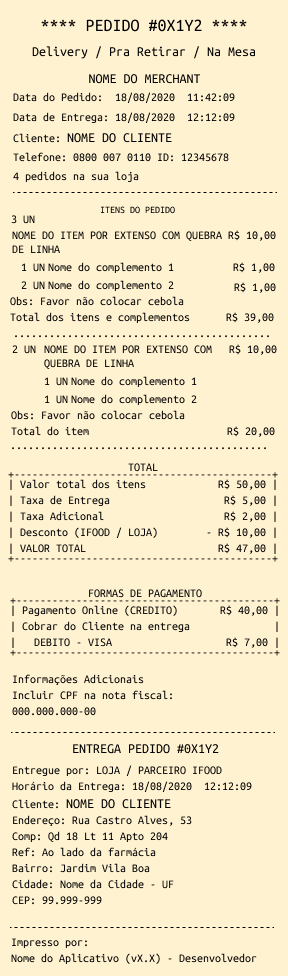
Printing (order form)
The order form (printed version of the order) can be useful for store operations during order preparation and is essential for the delivery person (self-delivery) to locate the customer's address.⚠️ Do not print CPF and address information on documents intended for delivery partners. This measure protects customer privacy and prevents the misuse of personal information.
Was this page helpful?
Rate your experience in the new Developer portal:
On this page
Content read0%