 K
KModules
Logistics
Authentication
Merchant
Catalog
Order
Events
Shipping
Review
Financial
Solutions
Overview
The webhook delivers server-to-server events in real time. We recommend its use when the integrator manages multiple merchants and centralizes orders. This method avoids the limitations of polling in integrations with many merchants.The webhook is only available for applications with centralized authentication.
Polling vs Webhook
Webhooks avoid the use of continuous polling. The example below shows how the requests/create event uses webhooks to notify instead of querying.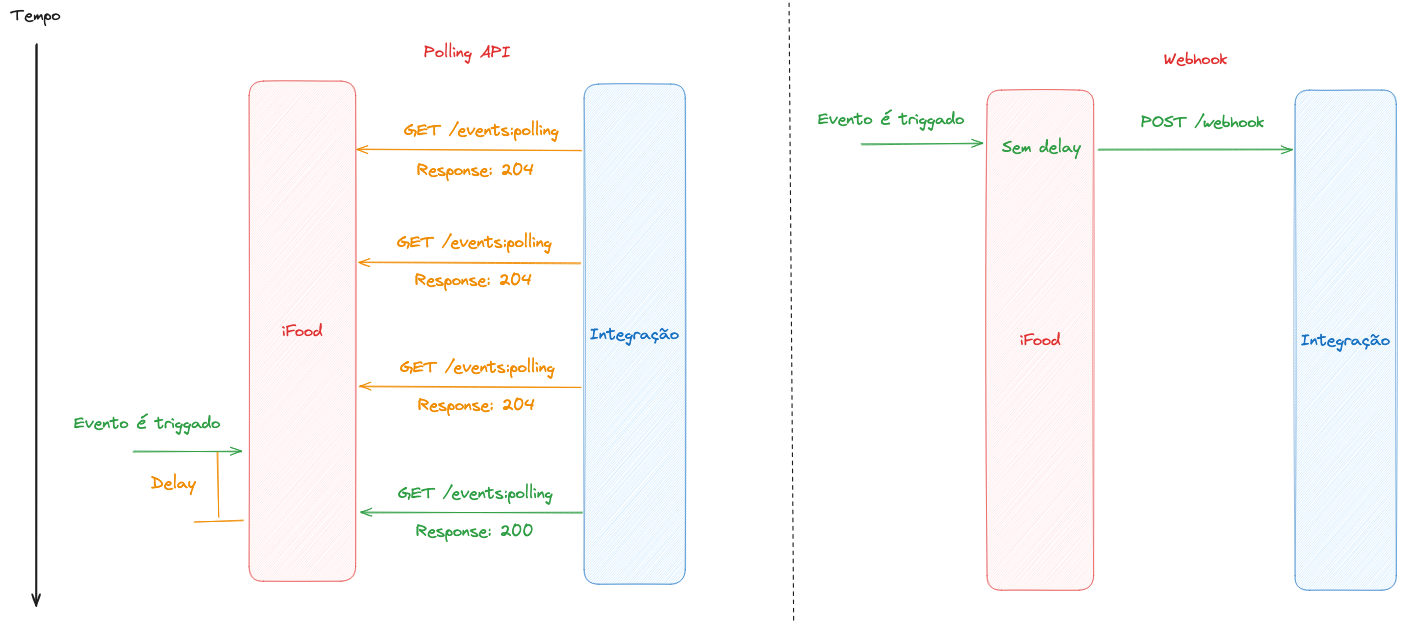 The application specifies an HTTPS endpoint hosted by the integrator's server to receive webhook events.
Webhook concepts
The following definitions detail the main webhook concepts.Event
A single event messageRequest signature
A header containing a webhook validation stringWebhook request
iFood sends at least one HTTP request for each event to each application registered in the webhook. The request includes the message body, signature header, and possible metadata in the headers.Webhook presence
Presence represents the connection status that indicates whether the store is open or closed in the iFood appTesting the webhook
The webhook configuration tab in the Developer Portal includes a button to test the connection. This button sends a mock presence request to the registered endpoint. The request is not generated by the real webhook service and does not produce a heartbeat. Use this feature only to simulate a request and validate the integration.The Developer Portal also offers a tool to generate test orders. It createsPLACED events delivered by polling and webhook.Resilience
iFood attempts to deliver events for an order for up to 15 minutes after the first attempt. If all attempts fail, the event is discarded. iFood may adjust the number of attempts, the interval between them, and the maximum delivery time. We will notify about possible reductions in the last attempt deadline.Error notifications
Applications integrated by webhook receive error notifications when delivery failures occur. Each event is sent in a separate request. If a delivery fails due to unavailability, timeout, or error, the system sends an automatic notification to the application's registered email.The type of notification varies according to the criticality of the detected error.- Healthcheck failure: If the healthcheck verification, linked to the [presence concept](/docs/guides/modules/events/presence), shows an error, we send a daily notification while the problem persists. We expect immediate action due to the severity.
- Error Alert: We notify once a day when we detect few errors in the same period, until the problem is resolved.
- Critical Error Alert: If the number of errors is very high in a period, we send notifications every 4 hours until resolution. Immediate action is necessary.
- Webhook disabled: If a critical error is not resolved within 72 hours, we disable the webhook and notify about the action.
Limitations
- Each application can register a single webhook URL, with up to 250 characters.
- The webhook does not guarantee the delivery order of events. Due to differences in processing time, you may receive a confirmation before order creation, although this is rare.
- The webhook guarantees "at least once" delivery. An endpoint may receive the same event more than once. Use the
idfield to identify duplicates. - The webhook delivers different types of events to the same endpoint. It does not offer filters by event type or merchant, as in polling. The integrator must select the events it wants to handle.
- The webhook does not have an acknowledgment mechanism. Even with retry attempts, the system may discard events after several delivery failures. It is not possible to recover these events automatically. Use polling as fallback in cases of prolonged instability.
- Polling and webhook work independently. To use polling as fallback or reconciliation, send acknowledgment requests to the polling system. We recommend polling every 5 minutes. Most requests should return empty, as the webhook will have already delivered the events.
Homologation criteria
- Receive events via webhook from iFood events successfully.
- Respond with failure to events with invalid signature.
Was this page helpful?
Rate your experience in the new Developer portal: