 K
KModules
Logistics
Authentication
Merchant
Catalog
Order
Events
Shipping
Review
Financial
Solutions
Order negotiation implementation guide
Complete workflow examples and testing procedures for order negotiation. For API reference, constants, and entities, see Order negotiation platform.Testing flows
Cancellation after delivery
Full cancellation
The customer receives the order and requests full cancellation. The merchant can accept, reject, or offer a refund.Accept the cancellation negotiation
- Create an order
- Merchant must confirm and ship the order
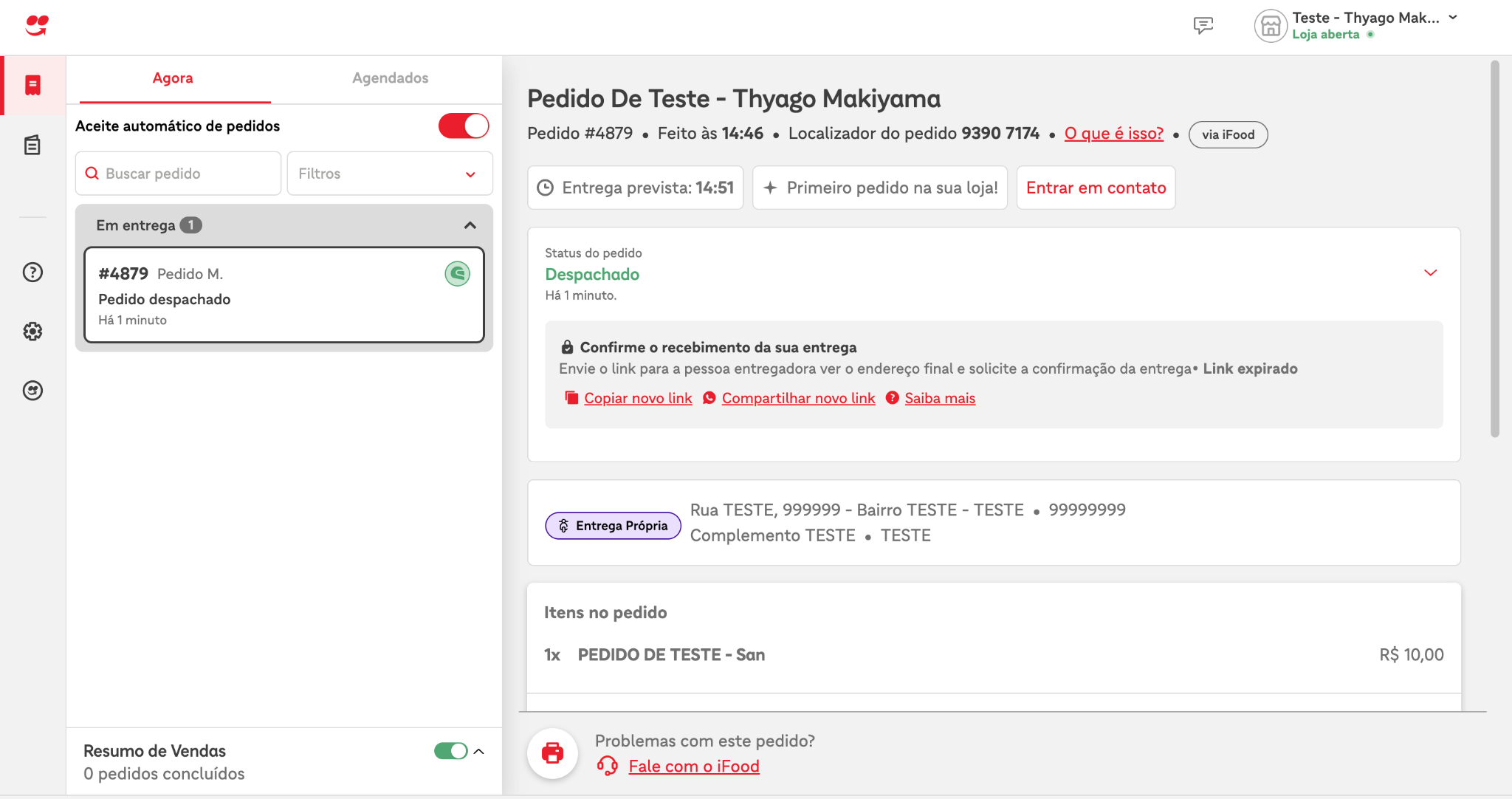
- Customer must confirm receipt of order
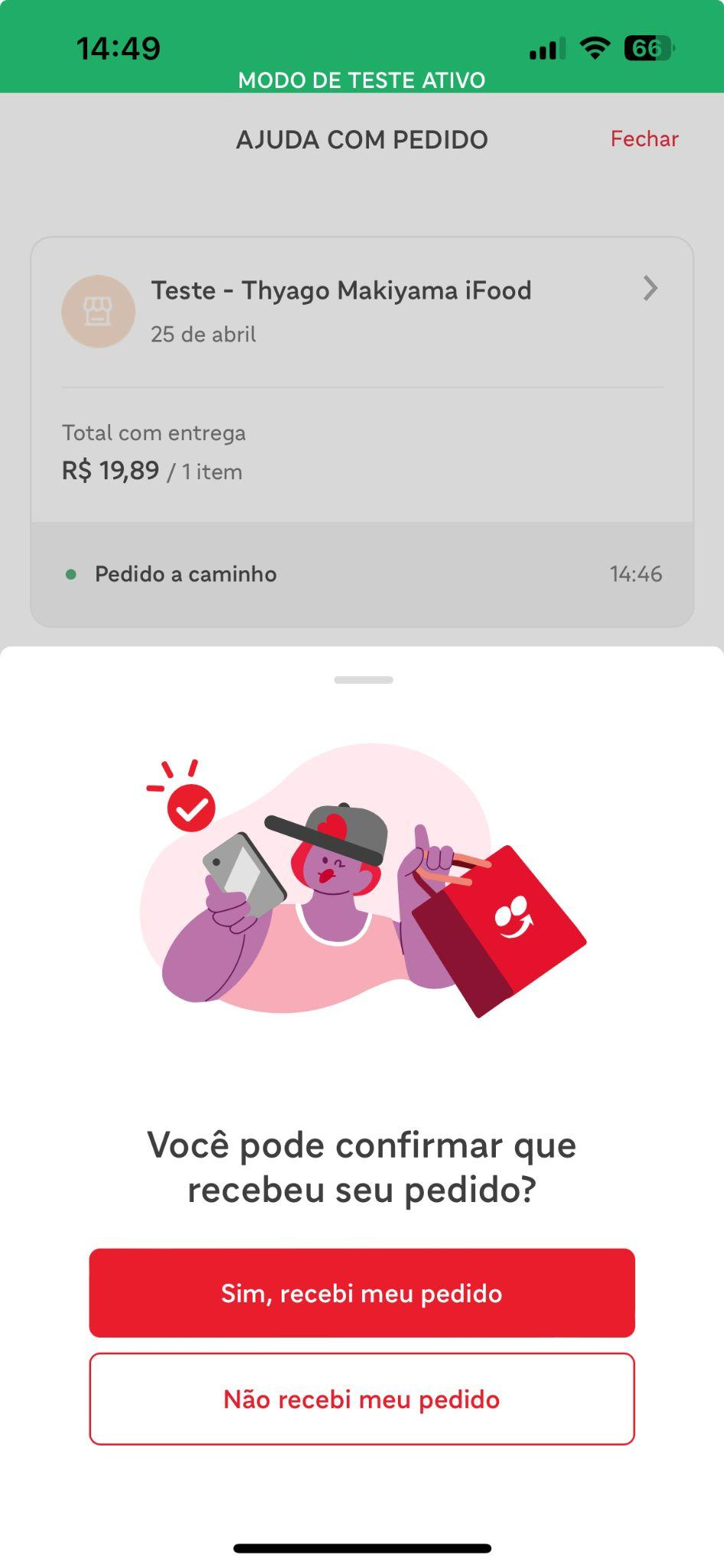
- Customer must request cancellation of the orderTo request order cancellation, open the customer app, open the order, click Help > Order arrived incorrect > Fill out the form selecting all items > Send the information > Select the option "I do not want to receive a refund on my iFood balance".
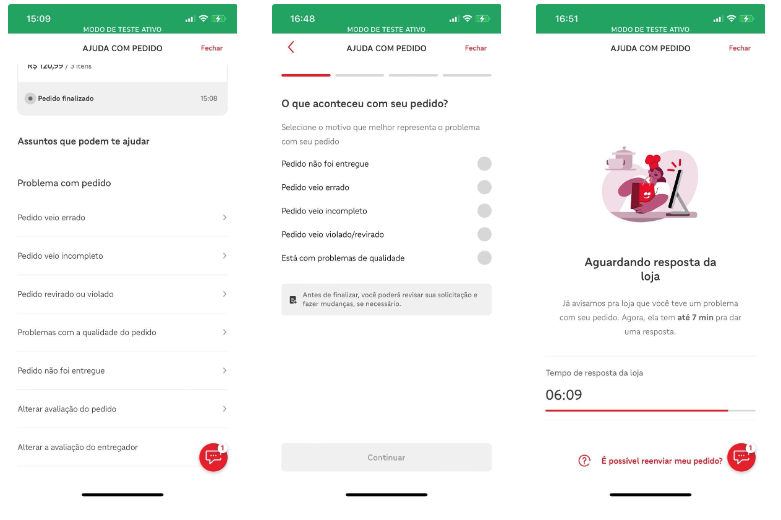 At this point, the cancellation platform will receive the cancellation request and, after validating the cancellation policies, will initiate a negotiation with the restaurant. This negotiation is represented by the HANDSHAKE_DISPUTE event. This event will be available for polling via the merchant API.
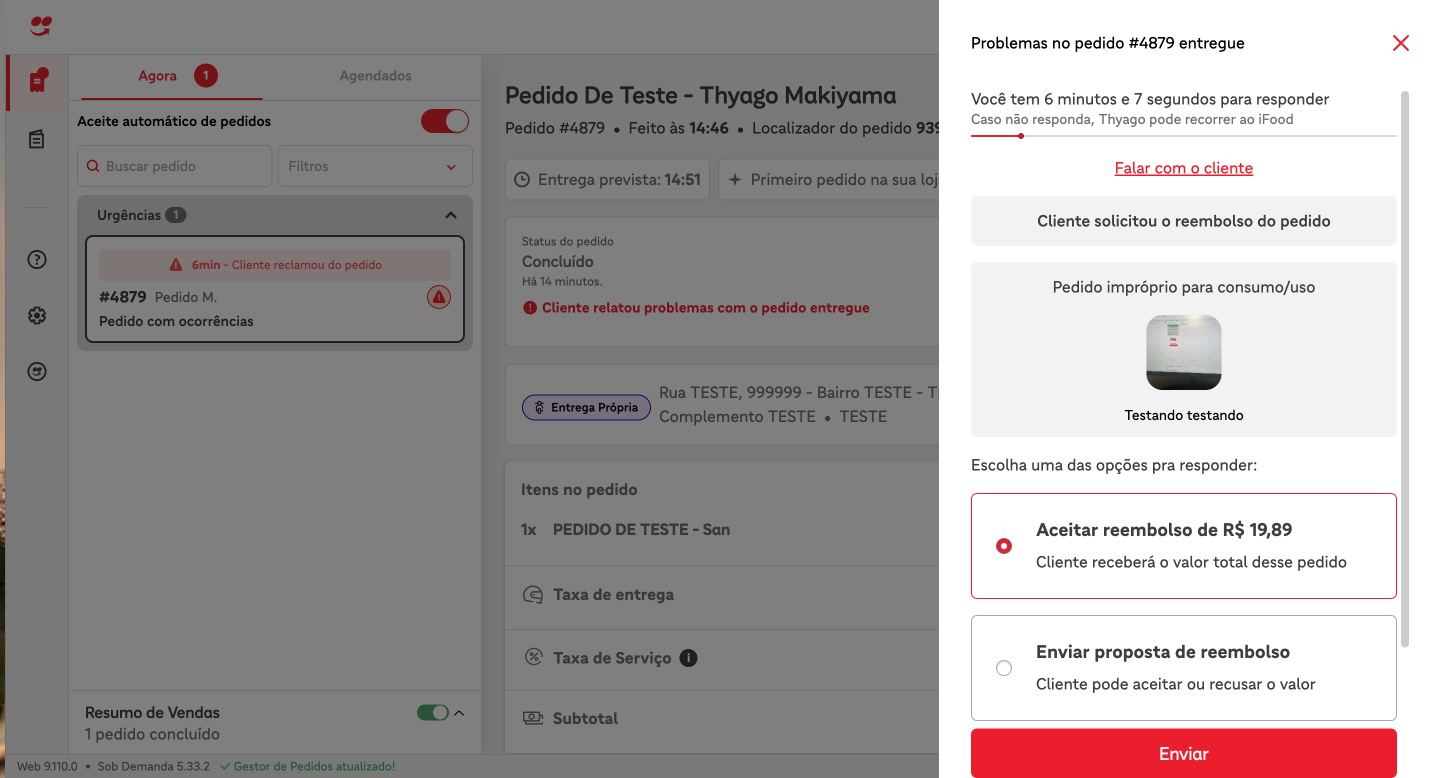
{ "id":"d74ac331-9e5b-467f-96fe-57c143b9177a", "code":"HSD", "fullCode":"HANDSHAKE_DISPUTE", "orderId":"6211e666-2fec-4369-b261-5a422c5ef350", "merchantId":"d1a3bc50-6103-49e0-afeb-b619b753fe69", "createdAt":"2024-04-25T18:02:46.921Z", "metadata":{ "action":"CANCELLATION", "alternatives":[ { "id":"9945f8f1-03ff-4762-8cfd-0f20db66741d", "metadata":{ "maxAmount":{ "currency":"BRL", "value":"800" } }, "type":"REFUND" } ], "createdAt":"2024-04-25T18:02:46.798698Z", "disputeId":"0a2d440f-98f3-4919-ac0b-aa5afe8f4135", "expiresAt":"2024-04-25T18:09:46.798698Z", "handshakeGroup":"CUSTOMER_ORDER_SUPPORT", "handshakeType":"AFTER_DELIVERY", "message":"Testando testando", "metadata":{ "evidences":[ { "contentType":"image/jpeg", "url":"https://merchant-api.ifood.com.br/order/v1.0/orders/6211e666-2fec-4369-b261-5a422c5ef350/cancellationEvidences/4c76b8ea-51db-42d5-806f-1a086753bc4a" } ] }, "timeoutAction":"REJECT_CANCELLATION" } } - Merchant must respond to cancellation requestPara responder, o merchant pode optar em usar o Gestor de pedidos ou a merchant-api. Seguem exemplos das duas maneiras de interagir com a negociação.
Exemplo imagem do Gestor de pedidos
 Example request for merchant-api
curl --location --request POST 'https://merchant-api.ifood.com.br/order/v1.0/disputes/2097e3ef-1e0e-46ad-a083-5b39cd615df7/accept' \ --header 'Authorization: Bearer jwt-token' \ --data '' - After the merchant's response, an event called HANDSHAKE_SETTLEMENT representing the option the merchant chose will be available via polling in the merchant-api.
{ "id":"4bf1cd30-e50b-41b8-9827-0ad448d3c700", "code":"HSS", "fullCode":"HANDSHAKE_SETTLEMENT", "orderId":"6211e666-2fec-4369-b261-5a422c5ef350", "merchantId":"d1a3bc50-6103-49e0-afeb-b619b753fe69", "createdAt":"2024-04-25T18:03:43.186Z", "metadata":{ "createdAt":"2024-04-25T18:03:43.083117651Z", "disputeId":"0a2d440f-98f3-4919-ac0b-aa5afe8f4135", "status":"ACCEPTED" } }
Reject cancellation negotiation
- Create an order
- Merchant must confirm and ship the order
- Customer must confirm receipt of order
- Customer must request cancellation of the order
- To request order cancellation, open the customer app, open the order, click Help > Order came wrong > Fill out the form selecting all items > Send the information > Select the option "I do not want to receive a refund on my iFood balance".
- At this point, the cancellation platform will receive the cancellation request and, after validating the cancellation policies, will initiate a negotiation with the restaurant. This negotiation is represented by the HANDSHAKE_DISPUTE event. This event will be available for polling via the merchant API.
{ "id":"41597d87-79f1-4a8b-a66d-d575e0a7ccc2", "code":"HSD", "fullCode":"HANDSHAKE_DISPUTE", "orderId":"3c5332ee-0616-44de-bff3-37a40b93f834", "merchantId":"d1a3bc50-6103-49e0-afeb-b619b753fe69", "createdAt":"2024-04-25T19:05:24.098Z", "metadata":{ "action":"PARTIAL_CANCELLATION", "alternatives":[ { "id":"5154c746-918b-4f85-80b1-3b5a448710bb", "metadata":{ "maxAmount":{ "currency":"BRL", "value":"2080" } }, "type":"REFUND" } ], "createdAt":"2024-04-25T19:05:23.953526Z", "disputeId":"9eec04a6-5374-4e20-9713-29926924fbc1", "expiresAt":"2024-04-25T19:12:23.953526Z", "handshakeGroup":"CUSTOMER_ORDER_SUPPORT", "handshakeType":"AFTER_DELIVERY_PARTIALLY", "metadata":{ "garnishItems":[ { "amount":{ "currency":"BRL", "value":"300" }, "id":"2bb737bf-1b72-419d-a77d-8047f07dd144", "index":0, "parentUniqueId":"631839cb-05ca-428b-ba1f-ab1ee7ecc57a", "quantity":3, "reason":"Testando test" } ] }, "timeoutAction":"REJECT_CANCELLATION" } } - Merchant must respond to cancellation requestTo respond, the merchant can choose to use the Order Manager or the merchant-api. Below are examples of both ways to interact with the transaction.
Example of an Order Manager image
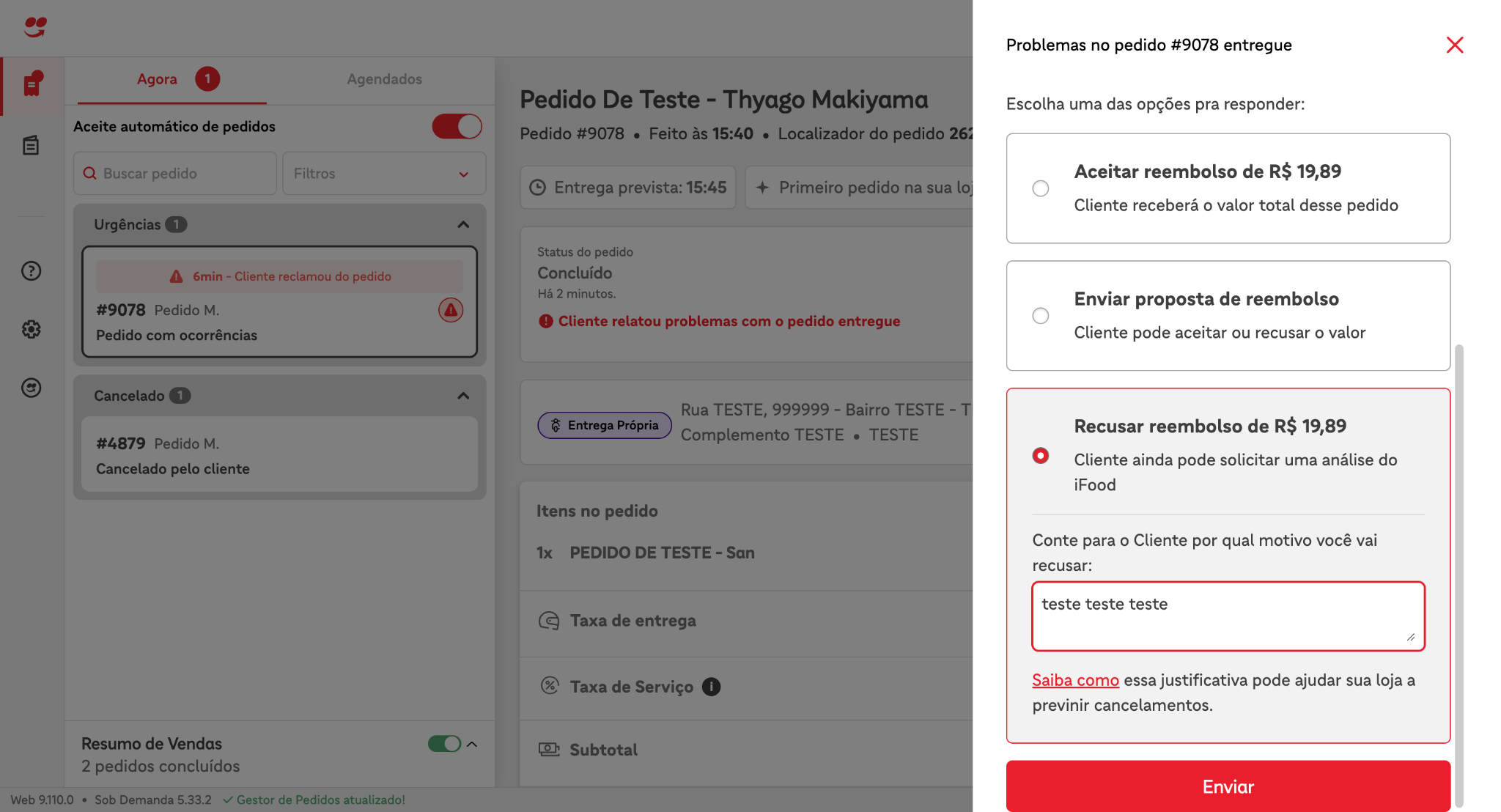 Exemplo de request para merchant-api
curl --location --request POST \ 'https://merchant-api.ifood.com.br/order/v1.0/disputes/2097e3ef-1e0e-46ad-a083-5b39cd615df7/reject' \ --header 'Authorization: Bearer jwt-token' \ --data '{ "reason": "some reason" }' - After the merchant's response, an event called HANDSHAKE_SETTLEMENT representing the option the merchant chose will be available via polling in the merchant-api.
{ "id":"4bf1cd30-e50b-41b8-9827-0ad448d3c700", "code":"HSS", "fullCode":"HANDSHAKE_SETTLEMENT", "orderId":"6211e666-2fec-4369-b261-5a422c5ef350", "merchantId":"d1a3bc50-6103-49e0-afeb-b619b753fe69", "createdAt":"2024-04-25T18:03:43.186Z", "metadata":{ "createdAt":"2024-04-25T18:03:43.083117651Z", "disputeId":"0a2d440f-98f3-4919-ac0b-aa5afe8f4135", "reason":"teste teste teste", "status":"REJECTED" } }
Submit refund proposal
- Create an order
- Merchant must confirm and ship the order
- Customer must confirm receipt of order
- Customer must request cancellation of the order
- To request order cancellation, open the customer app, open the order, click Help > Order came wrong > Fill out the form selecting all items > Send the information > Select the option "I do not want to receive a refund on my iFood balance".
- At this point, the cancellation platform will receive the cancellation request and, after validating the cancellation policies, will initiate a negotiation with the restaurant. This negotiation is represented by the HANDSHAKE_DISPUTE event. This event will be available for polling via the merchant API.
{ "id":"d74ac331-9e5b-467f-96fe-57c143b9177a", "code":"HSD", "fullCode":"HANDSHAKE_DISPUTE", "orderId":"6211e666-2fec-4369-b261-5a422c5ef350", "merchantId":"d1a3bc50-6103-49e0-afeb-b619b753fe69", "createdAt":"2024-04-25T18:02:46.921Z", "metadata":{ "action":"CANCELLATION", "alternatives":[ { "id":"9945f8f1-03ff-4762-8cfd-0f20db66741d", "metadata":{ "maxAmount":{ "currency":"BRL", "value":"800" } }, "type":"REFUND" } ], "createdAt":"2024-04-25T18:02:46.798698Z", "disputeId":"0a2d440f-98f3-4919-ac0b-aa5afe8f4135", "expiresAt":"2024-04-25T18:09:46.798698Z", "handshakeGroup":"CUSTOMER_ORDER_SUPPORT", "handshakeType":"AFTER_DELIVERY", "message":"Testando testando", "metadata":{ "evidences":[ { "contentType":"image/jpeg", "url":"https://merchant-api.ifood.com.br/order/v1.0/orders/6211e666-2fec-4369-b261-5a422c5ef350/cancellationEvidences/4c76b8ea-51db-42d5-806f-1a086753bc4a" } ] }, "timeoutAction":"REJECT_CANCELLATION" } } - Merchant must respond to cancellation requestTo respond, the merchant can choose to use the Order Manager or the merchant-api. Below are examples of both ways to interact with the transaction.
Example of an Order Manager image
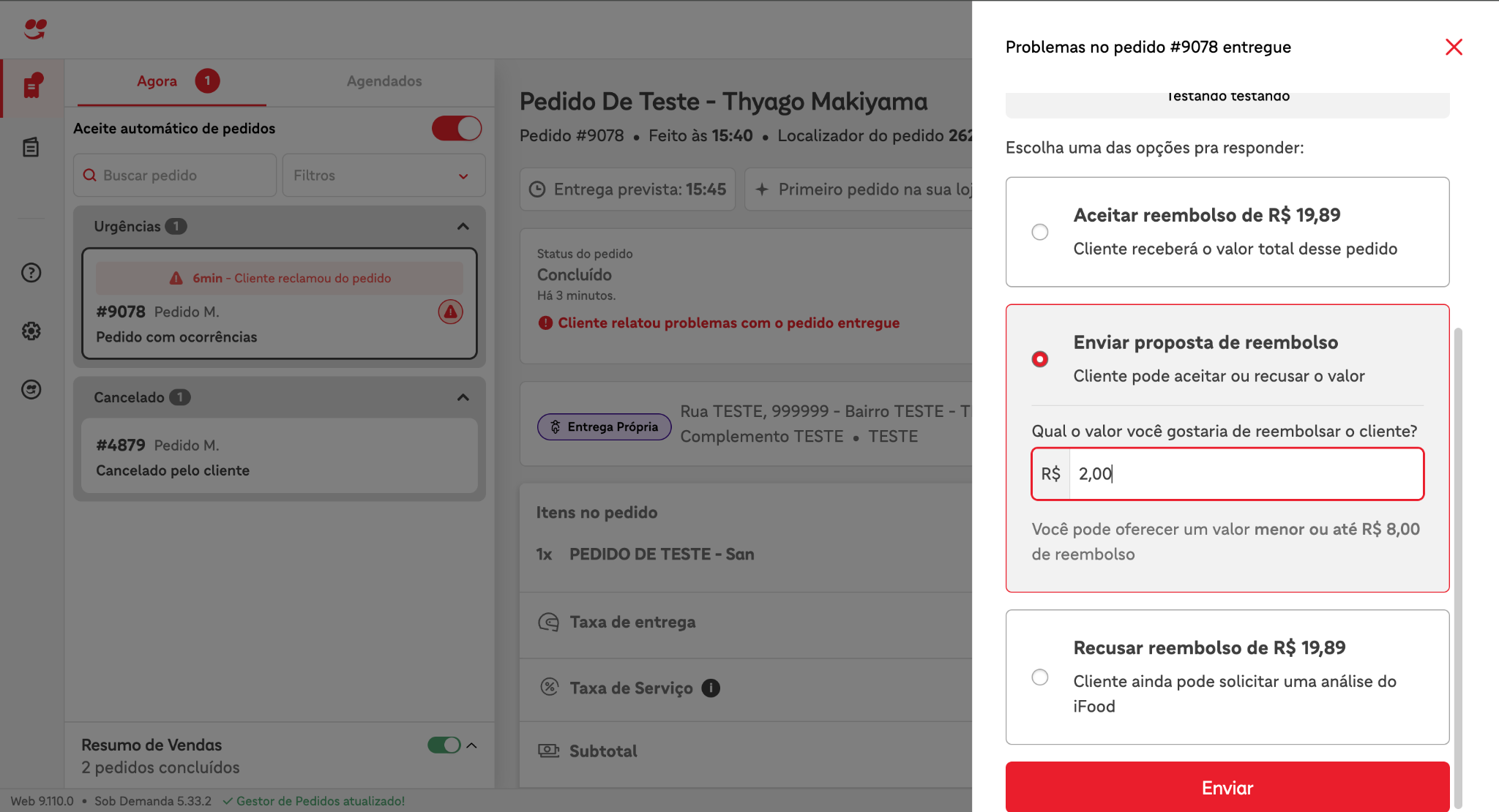 Request example for merchant-api
curl --location --request POST \ 'https://merchant-api.ifood.com.br/order/v1.0/disputes/2097e3ef-1e0e-46ad-a083-5b39cd615df7/alternatives/9945f8f1-03ff-4762-8cfd-0f20db66741d' \ --header 'Authorization: Bearer jwt-token' \ --data '{ \ "type": "REFUND", \ "metadata": { \ "amount": { \ "currency": "BRL", \ "value": "200" \ }}}' - After the merchant's response, an event called HANDSHAKE_SETTLEMENT representing the option the merchant chose will be available via polling in the merchant-api.
{ "id":"3e561c1f-391f-460d-99c1-4858e43f6fa4", "code":"HSS", "fullCode":"HANDSHAKE_SETTLEMENT", "orderId":"98403df8-828b-41e3-a3d1-0c9265e854a6", "merchantId":"d1a3bc50-6103-49e0-afeb-b619b753fe69", "createdAt":"2024-04-25T18:47:26.185Z", "metadata":{ "createdAt":"2024-04-25T18:47:26.047174208Z", "disputeId":"d3d271f4-886c-4c75-b6bf-8ee3d1e7708c", "selectedDisputeAlternative":{ "id":"ec7e0d30-c305-4037-8b82-3dca7d9fb0a3", "metadata":{ "amount":{ "currency":"BRL", "value":"200" } }, "type":"REFUND" }, "status":"ALTERNATIVE_REPLIED" } } - Finally, the merchant will receive another HANDSHAKE_SETTLEMENT event via polling, informing them of the customer's response—that is, whether the customer accepted, declined, or did not respond to the refund proposal sent by the merchant. In this case, the customer accepted the refund. If the customer does not accept the refund, the metadata status will be REJECTED. If the customer does not respond to the refund proposal, the same metadata will be EXPIRED.
{ "id":"1cba5e42-fe07-45f4-8eed-b3188de5ffeb", "code":"HSS", "fullCode":"HANDSHAKE_SETTLEMENT", "orderId":"98403df8-828b-41e3-a3d1-0c9265e854a6", "merchantId":"d1a3bc50-6103-49e0-afeb-b619b753fe69", "createdAt":"2024-04-25T18:50:05.149Z", "metadata":{ "createdAt":"2024-04-25T18:50:05.051587724Z", "disputeId":"d145bcc6-b5a3-40a6-b9de-a206ac7b536c", "status":"ACCEPTED" } }
Partial cancellation
This negotiation occurs when the customer receives the order and then requests to cancel items in the order. The merchant receives the cancellation request and can then accept the cancellation, decline the cancellation, or offer a refund to the customer. Below are the steps to simulate each situation.Accept cancellation negotiation
- Create an order
- Merchant must confirm and ship the order
- Customer must confirm receipt of order
- Customer must request cancellation of the order
- To request order cancellation, open the customer app, open the order, click Help > Order came wrong > Fill out the form by selecting some items > Send the information > Select the option "I do not want to receive a refund on my iFood balance".
- At this point, the cancellation platform will receive the cancellation request and, after validating the cancellation policies, will initiate a negotiation with the restaurant. This negotiation is represented by the HANDSHAKE_DISPUTE event. This event will be available for polling via the merchant API.
{ "id":"41597d87-79f1-4a8b-a66d-d575e0a7ccc2", "code":"HSD", "fullCode":"HANDSHAKE_DISPUTE", "orderId":"3c5332ee-0616-44de-bff3-37a40b93f834", "merchantId":"d1a3bc50-6103-49e0-afeb-b619b753fe69", "createdAt":"2024-04-25T19:05:24.098Z", "metadata":{ "action":"PARTIAL_CANCELLATION", "alternatives":[ { "id":"5154c746-918b-4f85-80b1-3b5a448710bb", "metadata":{ "maxAmount":{ "currency":"BRL", "value":"2080" } }, "type":"REFUND" } ], "createdAt":"2024-04-25T19:05:23.953526Z", "disputeId":"9eec04a6-5374-4e20-9713-29926924fbc1", "expiresAt":"2024-04-25T19:12:23.953526Z", "handshakeGroup":"CUSTOMER_ORDER_SUPPORT", "handshakeType":"AFTER_DELIVERY_PARTIALLY", "metadata":{ "garnishItems":[ { "amount":{ "currency":"BRL", "value":"300" }, "id":"2bb737bf-1b72-419d-a77d-8047f07dd144", "index":0, "parentUniqueId":"631839cb-05ca-428b-ba1f-ab1ee7ecc57a", "quantity":3, "reason":"Testando test" } ] }, "timeoutAction":"REJECT_CANCELLATION" } } - Merchant must respond to cancellation requestTo respond, the merchant can choose to use the Order Manager or the merchant-api. Below are examples of both ways to interact with the transaction.
Example of an Order Manager image
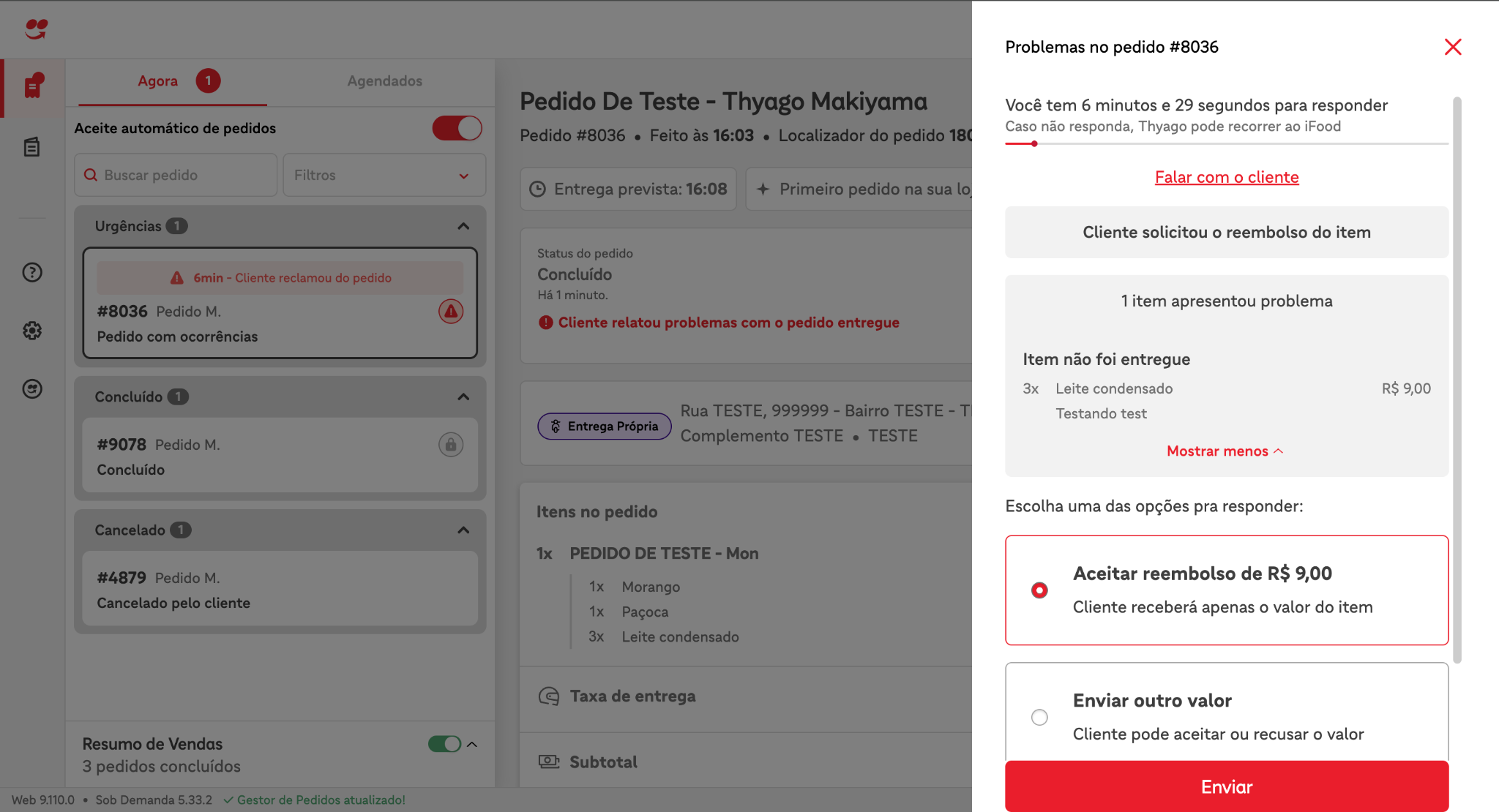 Request example for merchant-api
curl --location --request POST \ 'https://merchant-api.ifood.com.br/order/v1.0/disputes/2bb737bf-1b72-419d-a77d-8047f07dd144/accept' \ --header 'Authorization: Bearer jwt-token' \ --data '' - After the merchant's response, an event called HANDSHAKE_SETTLEMENT representing the option the merchant chose will be available via polling in the merchant-api.
{ "id":"7fb701a9-0996-4418-a3dc-8afa55786764", "code":"HSS", "fullCode":"HANDSHAKE_SETTLEMENT", "orderId":"3c5332ee-0616-44de-bff3-37a40b93f834", "merchantId":"d1a3bc50-6103-49e0-afeb-b619b753fe69", "createdAt":"2024-04-25T19:06:38.788Z", "metadata":{ "createdAt":"2024-04-25T19:06:38.692323486Z", "disputeId":"9eec04a6-5374-4e20-9713-29926924fbc1", "status":"ACCEPTED" } }
Reject cancellation negotiation
- Create an order
- Merchant must confirm and ship the order
- Customer must confirm receipt of order
- Customer must request cancellation of the order
- To request order cancellation, open the customer app, open the order, click Help > Order came wrong > Fill out the form by selecting some items > Send the information > Select the option "I do not want to receive a refund on my iFood balance".
- At this point, the cancellation platform will receive the cancellation request and, after validating the cancellation policies, will initiate a negotiation with the restaurant. This negotiation is represented by the HANDSHAKE_DISPUTE event. This event will be available for polling via the merchant API.
{ "id":"41597d87-79f1-4a8b-a66d-d575e0a7ccc2", "code":"HSD", "fullCode":"HANDSHAKE_DISPUTE", "orderId":"3c5332ee-0616-44de-bff3-37a40b93f834", "merchantId":"d1a3bc50-6103-49e0-afeb-b619b753fe69", "createdAt":"2024-04-25T19:05:24.098Z", "metadata":{ "action":"PARTIAL_CANCELLATION", "alternatives":[ { "id":"5154c746-918b-4f85-80b1-3b5a448710bb", "metadata":{ "maxAmount":{ "currency":"BRL", "value":"2080" } }, "type":"REFUND" } ], "createdAt":"2024-04-25T19:05:23.953526Z", "disputeId":"9eec04a6-5374-4e20-9713-29926924fbc1", "expiresAt":"2024-04-25T19:12:23.953526Z", "handshakeGroup":"CUSTOMER_ORDER_SUPPORT", "handshakeType":"AFTER_DELIVERY_PARTIALLY", "metadata":{ "garnishItems":[ { "amount":{ "currency":"BRL", "value":"300" }, "id":"2bb737bf-1b72-419d-a77d-8047f07dd144", "index":0, "parentUniqueId":"631839cb-05ca-428b-ba1f-ab1ee7ecc57a", "quantity":3, "reason":"Testando test" } ] }, "timeoutAction":"REJECT_CANCELLATION" } } - Merchant must respond to cancellation requestTo respond, the merchant can choose to use the Order Manager or the merchant-api. Below are examples of both ways to interact with the transaction.
Example of an Order Manager image
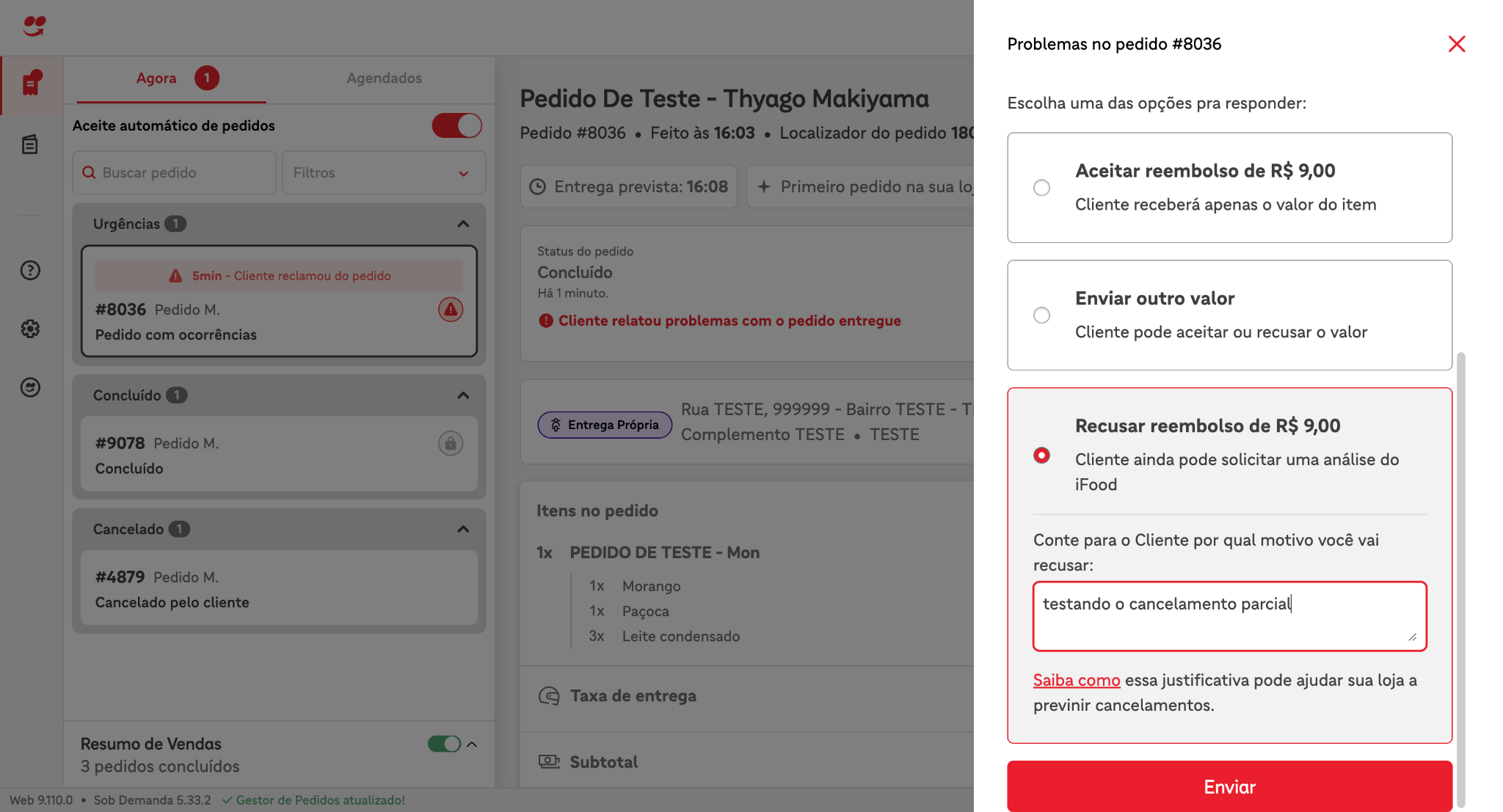 Request example for merchant-api
curl --location --request POST \ 'https://merchant-api.ifood.com.br/order/v1.0/disputes/2bb737bf-1b72-419d-a77d-8047f07dd144/reject \ --header 'Authorization: Bearer jwt-token' \ --data '{ "reason": "some reason" }' - After the merchant's response, an event called HANDSHAKE_SETTLEMENT representing the option the merchant chose will be available via polling in the merchant-api.
{ "id":"7fb701a9-0996-4418-a3dc-8afa55786764", "code":"HSS", "fullCode":"HANDSHAKE_SETTLEMENT", "orderId":"3c5332ee-0616-44de-bff3-37a40b93f834", "merchantId":"d1a3bc50-6103-49e0-afeb-b619b753fe69", "createdAt":"2024-04-25T19:06:38.788Z", "metadata":{ "createdAt":"2024-04-25T19:06:38.692323486Z", "disputeId":"9eec04a6-5374-4e20-9713-29926924fbc1", "reason":"testando o cancelamento parcial", "status":"REJECTED" } }
Submit refund proposal
- Create an order
- Merchant must confirm and ship the order
- Customer must confirm receipt of order
- Cliente deve solicitar o cancelamento do pedido
- To request an order cancellation, open the customer app, open the order, click Help > Order arrived incorrect > Fill out the form by selecting a few items > Submit the information > Select the option "I don't want to receive a refund to my iFood balance."
- At this point, the cancellation platform will receive the cancellation request and, after validating the cancellation policies, will initiate a negotiation with the restaurant. This negotiation is represented by the HANDSHAKE_DISPUTE event. This event will be available for polling via the merchant-api.
{ "id":"41597d87-79f1-4a8b-a66d-d575e0a7ccc2", "code":"HSD", "fullCode":"HANDSHAKE_DISPUTE", "orderId":"3c5332ee-0616-44de-bff3-37a40b93f834", "merchantId":"d1a3bc50-6103-49e0-afeb-b619b753fe69", "createdAt":"2024-04-25T19:05:24.098Z", "metadata":{ "action":"PARTIAL_CANCELLATION", "alternatives":[ { "id":"5154c746-918b-4f85-80b1-3b5a448710bb", "metadata":{ "maxAmount":{ "currency":"BRL", "value":"2080" } }, "type":"REFUND" } ], "createdAt":"2024-04-25T19:05:23.953526Z", "disputeId":"9eec04a6-5374-4e20-9713-29926924fbc1", "expiresAt":"2024-04-25T19:12:23.953526Z", "handshakeGroup":"CUSTOMER_ORDER_SUPPORT", "handshakeType":"AFTER_DELIVERY_PARTIALLY", "metadata":{ "garnishItems":[ { "amount":{ "currency":"BRL", "value":"300" }, "id":"2bb737bf-1b72-419d-a77d-8047f07dd144", "index":0, "parentUniqueId":"631839cb-05ca-428b-ba1f-ab1ee7ecc57a", "quantity":3, "reason":"Testando test" } ] }, "timeoutAction":"REJECT_CANCELLATION" } } - Merchant must respond to cancellation requestTo respond, the merchant can choose to use the Order Manager or the merchant-api. Below are examples of both ways to interact with the transaction.
Example of an Order Manager image
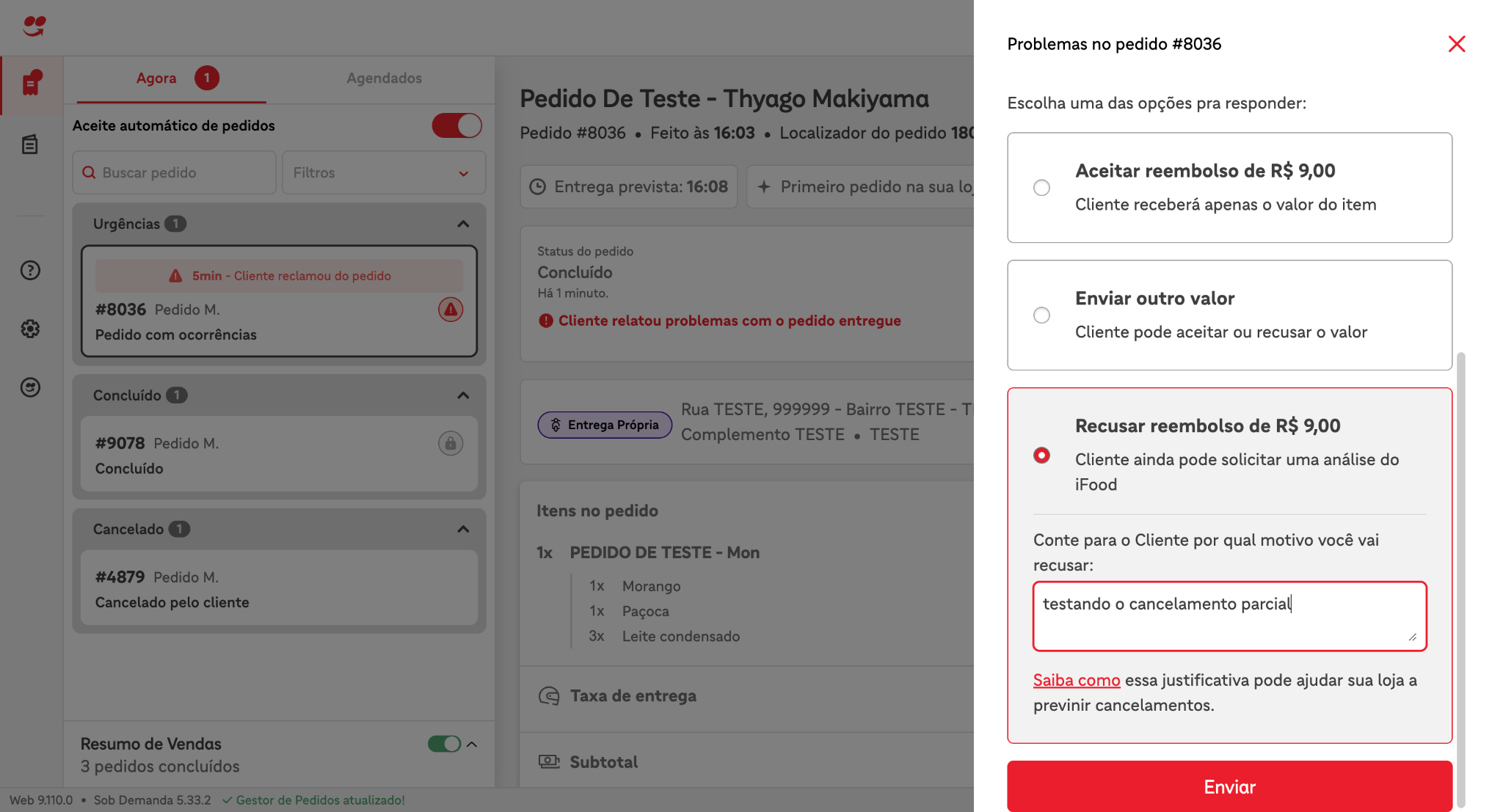 Example of a request to the merchant-api
curl --location --request POST \ 'https://merchant-api.ifood.com.br/order/v1.0/disputes/2bb737bf-1b72-419d-a77d-8047f07dd144/reject \ --header 'Authorization: Bearer jwt-token' \ --data '{ \ "reason": "some reason" \ }' - After the merchant's response, an event called HANDSHAKE_SETTLEMENT representing the option the merchant chose will be available via polling in the merchant-api.
{ "id":"4163c287-9855-47a6-a3d9-8712d8b698fe", "code":"HSS", "fullCode":"HANDSHAKE_SETTLEMENT", "orderId":"f8b78870-bb5c-4bc9-9de5-bda7dcf3a0ca", "merchantId":"d1a3bc50-6103-49e0-afeb-b619b753fe69", "createdAt":"2024-04-25T19:28:46.065Z", "metadata":{ "createdAt":"2024-04-25T19:28:45.942401249Z", "disputeId":"2bb737bf-1b72-419d-a77d-8047f07dd144", "selectedDisputeAlternative":{ "id":"5154c746-918b-4f85-80b1-3b5a448710bb", "metadata":{ "amount":{ "currency":"BRL", "value":"300" } }, "type":"REFUND" }, "status":"ALTERNATIVE_REPLIED" } } - Por fim, o merchant receberá via polling outro evento de HANDSHAKE_SETTLEMENT informando sobre a resposta do cliente, ou seja, se o cliente aceitou, recusou ou não respondeu a proposta de reembolso enviada pelo merchant. Neste caso o cliente aceitou o reembolso. Caso o cliente não aceite o reembolso o metadata status terá o valor REJECTED. Caso o cliente não responda a proposta de reembolso, o mesmo metadata terá o valor EXPIRED.
{
  "id":"1cba5e42-fe07-45f4-8eed-b3188de5ffeb",
  "code":"HSS",
  "fullCode":"HANDSHAKE_SETTLEMENT",
  "orderId":"98403df8-828b-41e3-a3d1-0c9265e854a6",
  "merchantId":"d1a3bc50-6103-49e0-afeb-b619b753fe69",
  "createdAt":"2024-04-25T18:50:05.149Z",
  "metadata":{
      "createdAt":"2024-04-25T18:50:05.051587724Z",
      "disputeId":"d145bcc6-b5a3-40a6-b9de-a206ac7b536c",
      "status":"ACCEPTED"
  }
}
Cancellation Negotiation During Preparation
This negotiation occurs when the customer requests a cancellation while the merchant is preparing the order. The merchant will receive the cancellation request and can either accept or decline the cancellation. Below are the steps to simulate each situation.Accept the cancellation negotiation
- Create an order
- The merchant must confirm the order
- The customer must request the order cancellation
- To request an order cancellation, open the customer app, open the order, click Help > I accidentally purchased > Cancel order > Fill out the form and submit.
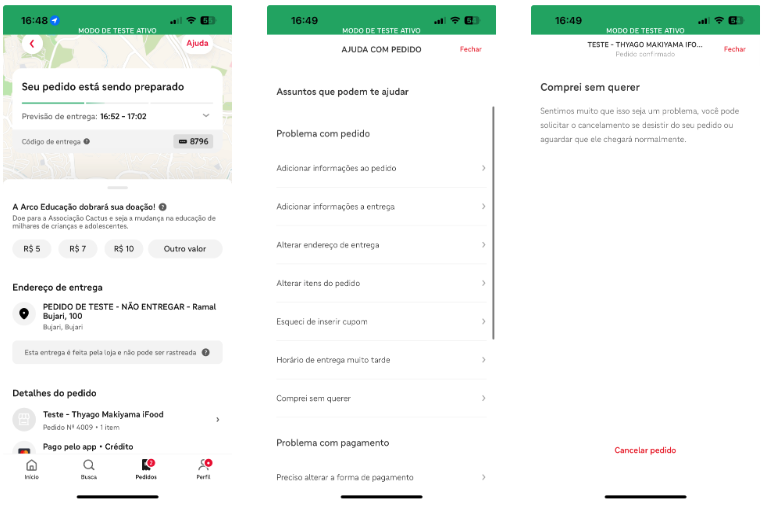
- At this point, the cancellation platform will receive the cancellation request and, after validating the cancellation policies, will initiate a negotiation with the restaurant. This negotiation is represented by the HANDSHAKE_DISPUTE event. This event will be available for polling via the merchant-api.
{ "id":"1d115926-c439-4cfb-a1df-f8fd4385f2aa", "code":"HSD", "fullCode":"HANDSHAKE_DISPUTE", "orderId":"f98c70e9-7dc0-4a07-abd1-c8c33e1cd48c", "merchantId":"d1a3bc50-6103-49e0-afeb-b619b753fe69", "createdAt":"2024-04-25T19:46:10.350Z", "metadata":{ "action":"CANCELLATION", "createdAt":"2024-04-25T19:46:10.252389Z", "disputeId":"b1cab1e3-d4fd-4808-b9eb-5789b04870f2", "expiresAt":"2024-04-25T19:51:10.252389Z", "handshakeGroup":"CUSTOMER_ORDER_SUPPORT", "handshakeType":"PREPARATION_TIME", "message":"Teste teste teste", "timeoutAction":"REJECT_CANCELLATION" } } - Merchant must respond to cancellation requestTo respond, the merchant can choose to use the Order Manager or the merchant-api. Below are examples of both ways to interact with the transaction.
Example of an Order Manager image
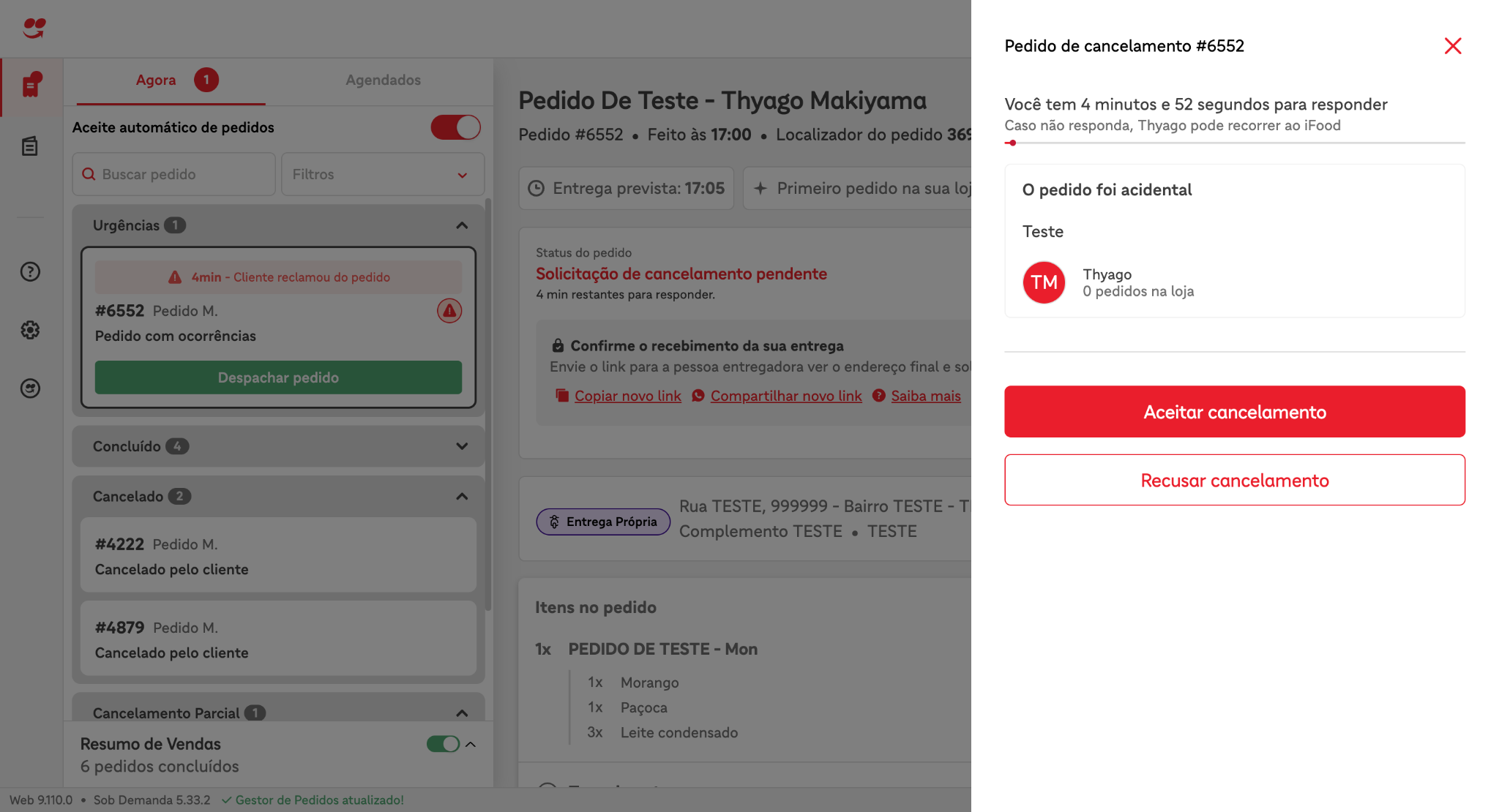 Example of a request to the merchant-api
curl --location --request POST \ 'https://merchant-api.ifood.com.br/order/v1.0/disputes/b1cab1e3-d4fd-4808-b9eb-5789b04870f2/accept' \ --header 'Authorization: Bearer jwt-token' \ --data '' - Após a resposta do merchant ficará disponível via polling na merchant-api um evento chamado HANDSHAKE_SETTLEMENT representando a opção que o merchant escolheu.
{
  "id":"12060fb5-9ce0-4c60-9bfa-cacc524fe0f3",
  "code":"HSS",
  "fullCode":"HANDSHAKE_SETTLEMENT",
  "orderId":"f98c70e9-7dc0-4a07-abd1-c8c33e1cd48c",
  "merchantId":"d1a3bc50-6103-49e0-afeb-b619b753fe69",
  "createdAt":"2024-04-25T19:46:47.576Z",
  "metadata":{
      "createdAt":"2024-04-25T19:46:47.474850698Z",
      "disputeId":"b1cab1e3-d4fd-4808-b9eb-5789b04870f2",
      "status":"ACCEPTED"
  }
}
Accept the cancellation negotiation
- Create an order
- Merchant must confirm the order
- Customer must request order cancellation
- To request order cancellation, open the customer app, open the order, click Help > I accidentally purchased > Cancel order > Fill out the form and submit.
- At this point, the cancellation platform will receive the cancellation request and, after validating the cancellation policies, will open a negotiation with the restaurant. This negotiation is represented by the HANDSHAKE_DISPUTE event. This event will be available for polling via the merchant-api.
{ "id":"1d115926-c439-4cfb-a1df-f8fd4385f2aa", "code":"HSD", "fullCode":"HANDSHAKE_DISPUTE", "orderId":"f98c70e9-7dc0-4a07-abd1-c8c33e1cd48c", "merchantId":"d1a3bc50-6103-49e0-afeb-b619b753fe69", "createdAt":"2024-04-25T19:46:10.350Z", "metadata":{ "action":"CANCELLATION", "createdAt":"2024-04-25T19:46:10.252389Z", "disputeId":"b1cab1e3-d4fd-4808-b9eb-5789b04870f2", "expiresAt":"2024-04-25T19:51:10.252389Z", "handshakeGroup":"CUSTOMER_ORDER_SUPPORT", "handshakeType":"PREPARATION_TIME", "message":"Teste teste teste", "timeoutAction":"REJECT_CANCELLATION" } } - Merchant must respond to the cancellation requestTo respond, the merchant can choose to use the Order Manager or the merchant-api. Below are examples of both ways to interact with the transaction.
Example of an Order Manager imageExample of a request to the merchant-api
curl --location --request POST \ 'https://merchant-api.ifood.com.br/order/v1.0/disputes/b1cab1e3-d4fd-4808-b9eb-5789b04870f2/reject \ --header 'Authorization: Bearer jwt-token' \ --data '{ \ "reason": "some reason" \ }' - After the merchant's response, an event called HANDSHAKE_SETTLEMENT representing the option the merchant chose will be available via polling in the merchant-api.
{
  "id":"12060fb5-9ce0-4c60-9bfa-cacc524fe0f3",
  "code":"HSS",
  "fullCode":"HANDSHAKE_SETTLEMENT",
  "orderId":"f98c70e9-7dc0-4a07-abd1-c8c33e1cd48c",
  "merchantId":"d1a3bc50-6103-49e0-afeb-b619b753fe69",
  "createdAt":"2024-04-25T19:46:47.576Z",
  "metadata":{
      "createdAt":"2024-04-25T19:46:47.474850698Z",
      "disputeId":"b1cab1e3-d4fd-4808-b9eb-5789b04870f2",
      "status":"REJECTED"
  }
}
Cancellation Negotiation Due to Delay
This negotiation occurs when a customer requests a cancellation due to an order being late. The merchant will receive the cancellation request and can either accept the cancellation or negotiate a new delivery time. Below are the steps to simulate each situation.This feature is currently in the rollout phase, so for the merchant to receive this negotiation, they must have the LC_OPS_ORDER_LATE_MARKETPLACE_CHAT_HANDSHAKE_ENABLED configuration set to S.Accept the cancellation negotiation
- Create an order
- Merchant must confirm the order
- Wait for the order to be late
- Customer must request order cancellation
- To request an order cancellation, open the customer app, open the order, and click I need help. A chat will open. The customer will receive a message, stating that the order hasn't arrived yet. Afterward, the customer will receive another message with a "I want a new estimate" button. Click the button.
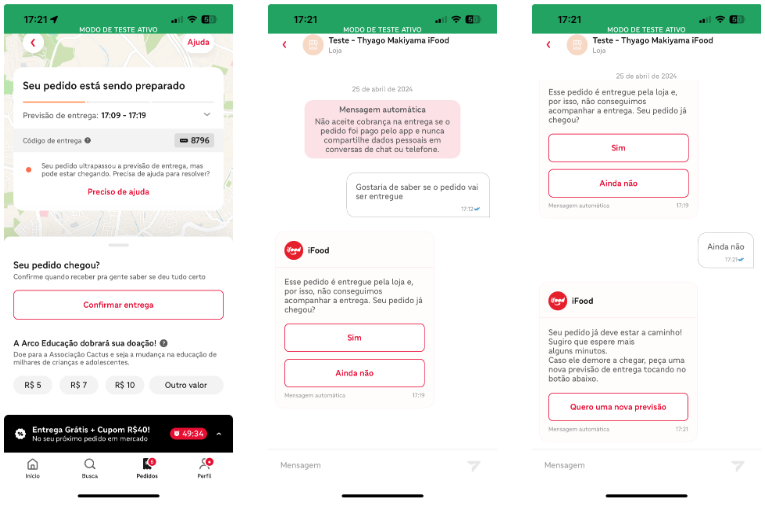
- At this point, the cancellation platform will receive the cancellation request and, after validating the cancellation policies, will initiate a negotiation with the restaurant. This negotiation is represented by the HANDSHAKE_DISPUTE event. This event will be available for polling via the merchant-api.
{ "id":"59c778f3-6e2a-476c-8d44-32c94cc64f6d", "code":"HSD", "fullCode":"HANDSHAKE_DISPUTE", "orderId":"66a772fb-899e-4b60-9c18-7580d68c8c27", "merchantId":"d1a3bc50-6103-49e0-afeb-b619b753fe69", "createdAt":"2024-04-25T20:31:49.529Z", "metadata":{ "action":"CANCELLATION", "alternatives":[ { "id":"db7c4043-2bd3-4f0a-aff5-0dc2f3f76bf8", "metadata":{ "allowedsAdditionalTimeInMinutes":[ 10, 15, 20, 30 ], "allowedsAdditionalTimeReasons":[ "HIGH_STORE_DEMAND", "OPERATIONAL_ISSUES", "LACK_OF_DRIVERS", "ORDER_OUT_FOR_DELIVERY", "DRIVER_IS_ALREADY_AT_THE_ADDRESS" ] }, "type":"ADDITIONAL_TIME" } ], "createdAt":"2024-04-25T20:31:49.420595Z", "disputeId":"b6a7fe78-34c8-4c11-ac81-060a0de8961f", "expiresAt":"2024-04-25T20:36:49.420595Z", "handshakeGroup":"CUSTOMER_ORDER_SUPPORT", "handshakeType":"DELAY", "message":"Handshake Order Late", "metadata":{ "acceptCancellationReasons":[ "HIGH_STORE_DEMAND", "STORE_SYSTEM_ISSUES", "STORE_INTERNAL_DIFFICULTIES", "LACK_OF_DRIVERS", "OTHER_REASONS" ] }, "timeoutAction":"REJECT_CANCELLATION" } } - Merchant must respond to cancellation requestTo respond, the merchant can choose to use the Order Manager or the merchant-api. Below are examples of both ways to interact with the transaction.
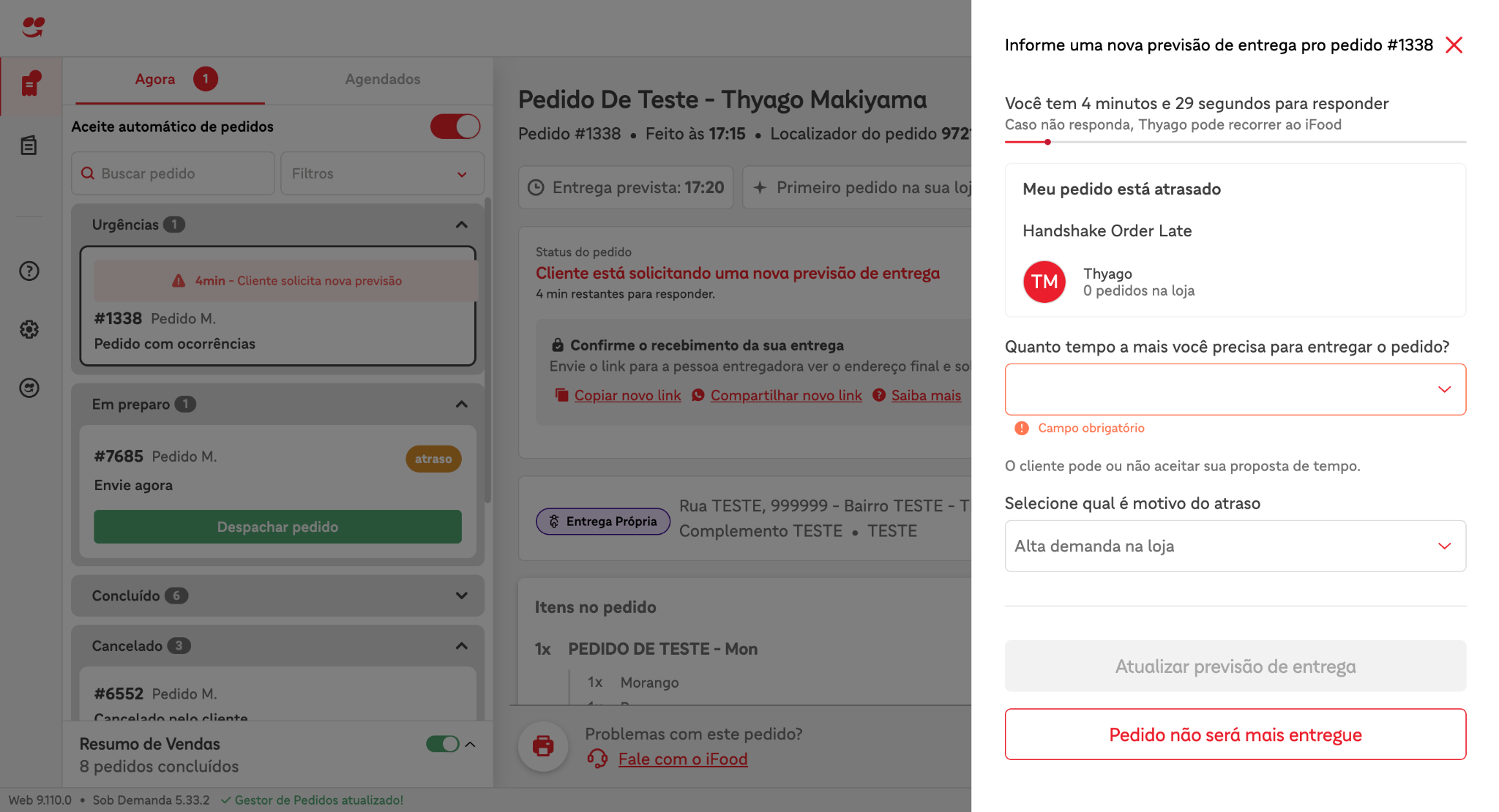
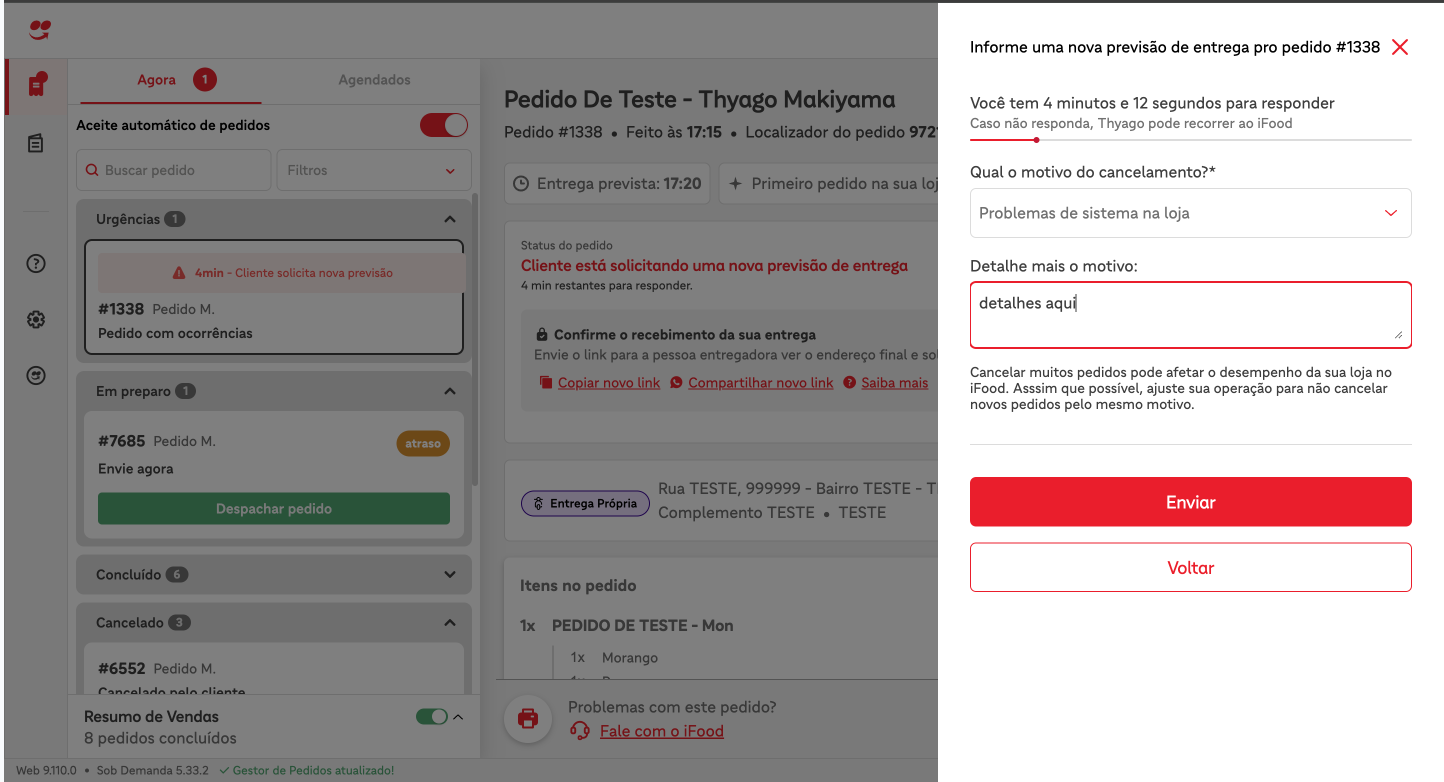
Example of an Order Manager image - Click "Order will no longer be delivered"
 Example: Enter the reason using the checkbox and, if desired, you can specify a little more about why the order will no longer be delivered.
 Example request to merchant-apiIn this specific transaction, when accepting the cancellation, the merchant must state why they are accepting the cancellation, providing one of the reasons listed in the HANDSHAKE_DISPUTE event in the acceptCancellationReasons metadata.
curl --location \ 'https://merchant-api.ifood.com.br/order/v1.0/disputes/2097e3ef-1e0e-46ad-a083-5b39cd615df7/accept' \ --header 'Content-Type: application/json' \ --header 'Authorization: Bearer jwt-token' \ --data '{ \ "reason": "STORE_SYSTEM_ISSUES" \ }' - After the merchant's response, an event called HANDSHAKE_SETTLEMENT representing the option the merchant chose will be available via polling in the merchant-api.
{
  "id":"5d76a147-c7f1-4952-81df-13dd5d1f215d",
  "code":"HSS",
  "fullCode":"HANDSHAKE_SETTLEMENT",
  "orderId":"66a772fb-899e-4b60-9c18-7580d68c8c27",
  "merchantId":"d1a3bc50-6103-49e0-afeb-b619b753fe69",
  "createdAt":"2024-04-25T20:32:39.448Z",
  "metadata":{
      "createdAt":"2024-04-25T20:32:39.335193155Z",
      "disputeId":"b6a7fe78-34c8-4c11-ac81-060a0de8961f",
      "reason":"STORE_SYSTEM_ISSUES",
      "status":"ACCEPTED"
  }
}
Negotiate New Delivery Time
- Create an order
- Merchant must confirm the order
- Wait for the order to be delayed
- Customer must request order cancellation
- To request order cancellation, open the customer app, open the order, and click I need help. A chat will open. The customer will receive a message stating that the order hasn't arrived yet. Afterward, the customer will receive another message with a "I want a new estimate" button. Click the button.
- At this point, the cancellation platform will receive the cancellation request and, after validating the cancellation policies, will initiate a negotiation with the restaurant. This negotiation is represented by the HANDSHAKE_DISPUTE event. This event will be available for polling via the merchant-api.
{ "id":"59c778f3-6e2a-476c-8d44-32c94cc64f6d", "code":"HSD", "fullCode":"HANDSHAKE_DISPUTE", "orderId":"66a772fb-899e-4b60-9c18-7580d68c8c27", "merchantId":"d1a3bc50-6103-49e0-afeb-b619b753fe69", "createdAt":"2024-04-25T20:31:49.529Z", "metadata":{ "action":"CANCELLATION", "alternatives":[ { "id":"db7c4043-2bd3-4f0a-aff5-0dc2f3f76bf8", "metadata":{ "allowedsAdditionalTimeInMinutes":[ 10, 15, 20, 30 ], "allowedsAdditionalTimeReasons":[ "HIGH_STORE_DEMAND", "OPERATIONAL_ISSUES", "LACK_OF_DRIVERS", "ORDER_OUT_FOR_DELIVERY", "DRIVER_IS_ALREADY_AT_THE_ADDRESS" ] }, "type":"ADDITIONAL_TIME" } ], "createdAt":"2024-04-25T20:31:49.420595Z", "disputeId":"b6a7fe78-34c8-4c11-ac81-060a0de8961f", "expiresAt":"2024-04-25T20:36:49.420595Z", "handshakeGroup":"CUSTOMER_ORDER_SUPPORT", "handshakeType":"DELAY", "message":"Handshake Order Late", "metadata":{ "acceptCancellationReasons":[ "HIGH_STORE_DEMAND", "STORE_SYSTEM_ISSUES", "STORE_INTERNAL_DIFFICULTIES", "LACK_OF_DRIVERS", "OTHER_REASONS" ] }, "timeoutAction":"REJECT_CANCELLATION" } } - Merchant must respond to the cancellation request.To respond, the merchant can choose to use the Order Manager or the merchant-api. Below are examples of both ways to interact with the transaction.
Example of an Order Manager image
Fill out the form, selecting the delay time and the reason for the delay. Click "Update delivery estimate."
 Example of a request to the merchant-api
In this specific transaction, when proposing a new delivery time, the merchant must indicate the delay time and the reason for the delay. The options the merchant can choose for this are listed in the HANDSHAKE_DISPUTE event, in the metadata alternatives.metadata.allowedsAdditionalTimeInMinutes and alternatives.metadata.allowedsAdditionalTimeReasons respectively.
Example of a request to the merchant-api
In this specific transaction, when proposing a new delivery time, the merchant must indicate the delay time and the reason for the delay. The options the merchant can choose for this are listed in the HANDSHAKE_DISPUTE event, in the metadata alternatives.metadata.allowedsAdditionalTimeInMinutes and alternatives.metadata.allowedsAdditionalTimeReasons respectively.curl --location \ 'https://merchant-api.ifood.com.br/order/v1.0/disputes/c95c9885-a0ac-447e-863c-158f97dffd08/alternatives/97c6529f-6d40-4a0a-a6c2-43b64590c81b' \ --header 'Content-Type: application/json' \ --header 'Authorization: Bearer jwt-token' \ --data '{ \ "type": "ADDITIONAL_TIME", \ "metadata": { \ "additionalTimeInMinutes": 30, \ "additionalTimeReason":"OPERATIONAL_ISSUES" \ } \ }' - After the merchant's response, an event called HANDSHAKE_SETTLEMENT representing the option the merchant chose will be available via polling in the merchant-api.
{ "id":"a803ca50-f452-43c7-bd90-6ba52367a7e9", "code":"HSS", "fullCode":"HANDSHAKE_SETTLEMENT", "orderId":"062ea86a-c71e-4285-a991-aad49538bf68", "merchantId":"d1a3bc50-6103-49e0-afeb-b619b753fe69", "createdAt":"2024-04-25T20:22:39.298Z", "metadata":{ "createdAt":"2024-04-25T20:22:39.154324166Z", "disputeId":"c993fb45-ef7d-495a-9561-b1f03f5712d7", "selectedDisputeAlternative":{ "id":"8052879f-a311-45b3-bf75-78a90b5728ab", "metadata":{ "additionalTimeMinutes":10, "additionalTimeReason":"HIGH_STORE_DEMAND" }, "type":"ADDITIONAL_TIME" }, "status":"ALTERNATIVE_REPLIED" } } - Finally, the merchant will receive another HANDSHAKE_SETTLEMENT event via polling, informing them of the customer's response—that is, whether the customer accepted, declined, or did not respond to the refund proposal sent by the merchant. In this case, the customer accepted the refund. If the customer does not accept the refund, the metadata status will be REJECTED. If the customer does not respond to the refund proposal, the same metadata will be EXPIRED.
{
  "id":"dae8bc7e-efbb-473f-b444-9024c5ca9a56",
  "code":"HSS",
  "fullCode":"HANDSHAKE_SETTLEMENT",
  "orderId":"062ea86a-c71e-4285-a991-aad49538bf68",
  "merchantId":"d1a3bc50-6103-49e0-afeb-b619b753fe69",
  "createdAt":"2024-04-25T20:22:49.030Z",
  "metadata":{
      "createdAt":"2024-04-25T20:22:48.923096307Z",
      "disputeId":"6cb058e7-7b17-4415-a957-24038ac522ec",
      "status":"ACCEPTED"
  }
}
How to view cancellation evidence images
Not every transaction will have cancellation evidence images. When there is cancellation evidence, simply make a GET request using the link in the metadata.evidences[X].url field. Below is a code example that retrieves cancellation evidence.<!DOCTYPE html>
<html lang="pt">
<head>
<meta charset="UTF-8">
<meta name="viewport" content="width=device-width, initial-scale=1.0">
<title>Imagem do Servidor</title>
</head>
<body>
<img id="imagemServidor" src="" alt="Imagem do Servidor" style="max-width: 100%; height:
auto;">
<script>
const urlImagem =
"https://merchant-api.ifood.com.br/order/v1.0/orders/abeff264-bf8b-472d-a6ad-11fea0096253/canc
ellationEvidences/89422573-3b50-421d-a0f4-051642e75f70";
const opcoesFetch = {
method: 'GET',
headers: {
'Authorization': 'Bearer jwt-token'
}
};
fetch(urlImagem, opcoesFetch)
.then(response => {
if (!response.ok) {
throw new Error('Falha ao buscar a imagem: ' + response.statusText);
}
return response.blob();
})
.then(blob => {
const urlBlob = URL.createObjectURL(blob);
document.getElementById('imagemServidor').src = urlBlob;
})
.catch(error => {
console.error('Erro:', error);
});
</script>
</body>
</html>Was this page helpful?
Rate your experience in the new Developer portal: